
Shipping with this method takes 3-5 days
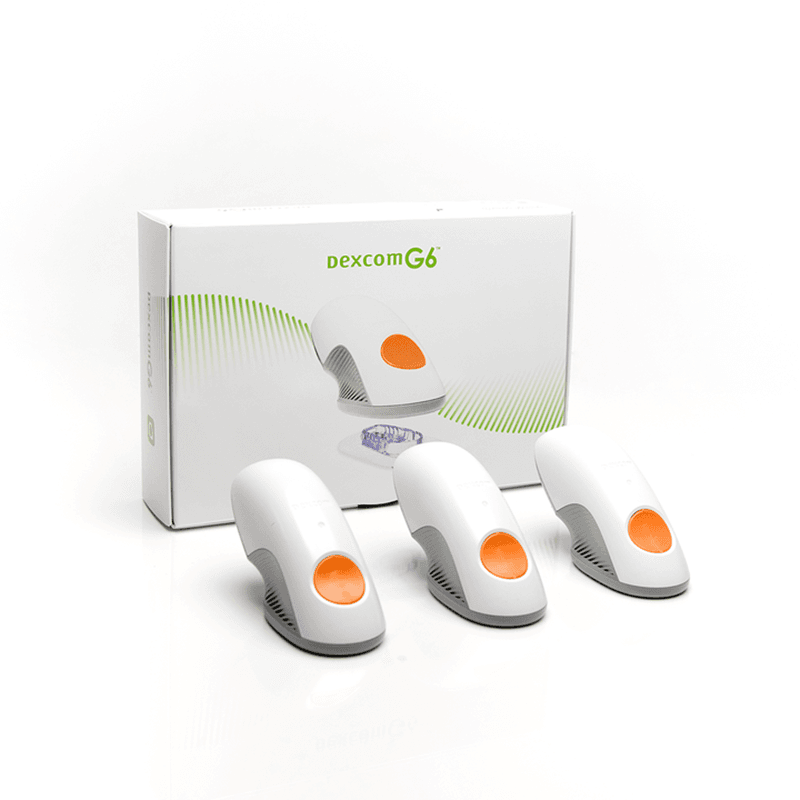
Dexcom G6 Sensor 3
Dexcom G6 Sensor 3 Product Overview and Safety
Price:
$359.99
You save


Dexcom G6 Sensor 3 is a wearable continuous glucose monitoring (CGM) sensor used to track glucose trends over time. It works with other system components to display readings, trend arrows, and alerts that can support day-to-day diabetes management. This page explains how the sensor works, general wear and handling basics, safety considerations, and practical access factors.
What Dexcom G6 Sensor Is and How It Works
A CGM sensor is a small device worn on the body that measures glucose in interstitial fluid (the fluid between cells). The Dexcom G6 Sensor is inserted just under the skin and sends glucose data to a compatible display device through a transmitter, enabling trend views and optional alerts. CanadianInsulin supports prescription referral and may verify details with your prescriber.
Some patients explore US shipping from Canada as one option for diabetes supplies, depending on eligibility and jurisdiction. Dexcom G6 Sensor 3 is packaged for single-person use and is intended to be replaced on the schedule described in the manufacturer instructions. Trend information can be helpful, but CGM values may lag behind blood glucose during rapid changes such as after meals or exercise. For broader education topics and tools, you can browse the Diabetes hub.
Who It’s For
This type of CGM sensor is generally used by people living with diabetes who want ongoing glucose trend information rather than single point-in-time checks. It may be considered for adults and children when the system is prescribed and set up according to the manufacturer labeling and local regulatory requirements. Many users rely on alerts to help recognize hypoglycemia (low blood glucose) or hyperglycemia (high blood glucose), especially overnight.
Dexcom G6 Sensor 3 may not be a fit for everyone. People with significant skin sensitivity to adhesives, frequent contact dermatitis, or difficulty keeping a wearable in place during work or sports may need additional planning. If you use diabetes medicines that can cause low blood glucose, it is reasonable to discuss how CGM trends should be interpreted alongside your overall treatment plan. For medication background that may come up in those conversations, the Mechanism Of Action guide offers general context on common therapies.
Dosage and Usage
For CGM sensors, “dosage” refers to the wear duration and replacement schedule rather than a drug dose. Dexcom G6 Sensor 3 is designed to be worn for a fixed session length, with a warm-up period before real-time readings begin. After the session ends, the sensor is removed and a new sensor is started in a different site, following the placement guidance in the user instructions.
Setup typically involves inserting the sensor using the supplied applicator, attaching the transmitter, and starting a new sensor session in the app or receiver. The system is factory-calibrated, but a fingerstick check may still be needed if the device requests calibration or if symptoms do not match the displayed value. Avoid making therapy changes based only on a single reading; trend direction and clinical context matter.
Quick tip: Keep a simple log of start dates and site locations.
- Site selection: Rotate locations to reduce irritation.
- Session starts: Start only after transmitter is secured.
- Confirm when needed: Use a meter if results seem wrong.
- Alarm settings: Review thresholds with a clinician.
Strengths and Forms
This product is a sensor supply item rather than a medication, so it does not have a “strength” in mg or IU. It is commonly sold as a box containing multiple sensor units, and each unit includes an insertion device and adhesive patch intended for one wear session. The sensor is only one component of the overall system and requires a compatible transmitter and display method to function.
Packaging and included accessories can vary by market and distributor. In many cases, optional overpatches, skin barrier films, or adhesive removers are used to improve wear time or make removal easier, especially for sensitive skin. Before using any accessory, check that it does not interfere with the sensor opening or transmitter fit.
| Component | What it does | Notes |
|---|---|---|
| Sensor unit | Measures interstitial glucose | Single-person, time-limited use |
| Applicator | Helps insert sensor | Use as directed; dispose safely |
| Adhesive patch | Holds sensor in place | Skin prep may affect adhesion |
Storage and Travel Basics
Store sensors according to the manufacturer temperature range and keep them in their original packaging until use. Avoid exposing supplies to freezing temperatures, direct sunlight, or high heat, which can damage components or adhesives. If a sensor has been stored outside recommended conditions, consult the manufacturer instructions before use.
For travel, plan around temperature extremes, packing limits, and backup options. Dexcom G6 Sensor 3 is a medical device, and many travelers carry supplies in a personal bag so they are not exposed to extreme temperatures in checked luggage. If you expect screening equipment or long travel days, consider preparing a short checklist and keeping extra adhesive and skin-prep items with you. For general temperature-handling principles that can apply to many health products, see Zepbound Storage Basics, and for broader trip planning, see Travel With Ozempic.
- Keep labels handy: Helps identify supplies quickly.
- Protect from moisture: Use a sealed pouch if needed.
- Bring backups: Include a glucose meter and strips.
- Rotate sites: Avoid irritated or bruised skin.
Side Effects and Safety
Most safety issues with CGM sensors relate to the skin and to how readings are interpreted. Common problems include redness, itching, mild pain at insertion, bruising, or adhesive-related irritation. Some users also report sensor lift or early detachment, which can lead to gaps in readings. If you have a history of adhesive allergy, consider discussing prevention steps and product selection with a clinician.
More serious concerns can include significant swelling, blistering, signs of infection (warmth, spreading redness, drainage), or symptoms of an allergic reaction. Another safety issue is acting on inaccurate readings. CGM values can be affected by compression on the sensor site, poor circulation, or rapid glucose changes. If you feel unwell and the number seems inconsistent, confirm with a fingerstick and follow your care plan for treating low or high blood glucose.
Why it matters: CGM readings can lag during fast glucose shifts.
For general safety concepts that patients often review alongside diabetes therapies, the Practical Safety Guide may be a useful reference point for discussions with your care team.
Drug Interactions and Cautions
A CGM sensor does not have drug-drug interactions in the way medicines do, but certain substances and conditions can interfere with readings. Some products containing acetaminophen may affect CGM performance at higher exposures; the degree of interference depends on the system and the manufacturer’s guidance. Always check the user instructions for any listed interfering substances and the recommended steps if you take them.
There are also important procedure-related cautions. Many CGM systems should not be worn during specific imaging or energy-based procedures, such as MRI, CT scans, or diathermy, because the device can be damaged and readings may be unreliable. Other practical cautions include avoiding insertion into areas with scar tissue, lipohypertrophy (thickened fatty tissue from repeated injections), or skin that is already irritated. If you use an insulin pump or automated insulin delivery feature, confirm system compatibility and setup instructions with the manufacturer and your clinician.
- Symptoms mismatch: Confirm with a meter.
- Procedure days: Ask about device removal.
- Skin health: Avoid broken or inflamed areas.
- Interfering substances: Review the labeling list.
Compare With Alternatives
Dexcom G6 Sensor 3 is part of a real-time CGM system that separates the sensor and transmitter. If you are comparing options, consider wear duration, alert features, compatibility with phones or receivers, and how the system fits your daily routine. Some people prefer a newer-generation platform with different form factors, while others prioritize maintaining continuity with a device they already know.
One close alternative is a newer Dexcom platform, which may use a different sensor design and component setup; see Dexcom G7 Sensor for the related item listing. Another comparison point is whether you have the correct G6 components on hand; the sensor requires a compatible transmitter, referenced on the Dexcom G6 Transmitter page. Outside CGM, standard blood glucose monitoring with a meter and strips provides spot checks, which can be useful as a backup and for confirming unexpected values.
When weighing alternatives, focus on practical issues: alarm fatigue, comfort during sleep, skin tolerance, data-sharing needs, and how often you want to see trends versus discrete readings.
Pricing and Access
Access to CGM supplies can depend on prescription requirements, documentation, and payer policies. Dexcom G6 Sensor 3 is often prescribed, and coverage rules may vary across private insurance, public plans, and workplace benefits. Dispensing is handled by licensed third-party pharmacies where permitted.
Out-of-pocket responsibility can be influenced by deductibles, prior authorization, quantity limits, and whether supplies are treated as pharmacy benefits or durable medical equipment. If you are planning without insurance, ask the prescriber’s office and payer (if any) what documentation is typically needed and how often renewals are required. For general budgeting frameworks some patients use when comparing health product expenses, see Out Of Pocket Planning, Low Income Prescription Help, and Low Income Medication Options. For a plain-language explanation of what can drive health product pricing across categories, see Pricing Factors Explained.
CanadianInsulin coordinates prescription referral, and cash-pay arrangements may be considered depending on eligibility and jurisdiction. For non-time-limited updates that may be relevant to planning, review Programs And Updates.
Authoritative Sources
For manufacturer safety and use information, review the Dexcom resource library: Dexcom Guides.
For a clinical overview of CGM in diabetes care, see the American Diabetes Association technology resources: ADA Continuous Glucose Monitors.
When temperature control is needed, packaging may use prompt, express, cold-chain shipping to help protect integrity.
This content is for informational purposes only and is not a substitute for professional medical advice.
Express Shipping - from $25.00
Prices:
- Dry-Packed Products $25.00
- Cold-Packed Products $35.00
Standard Shipping - $15.00
Shipping with this method takes 5-10 days
Prices:
- Dry-Packed Products $15.00
- Not available for Cold-Packed products
How long does each Dexcom G6 sensor last?
Each Dexcom G6 sensor is intended for a time-limited wear session as described in the manufacturer instructions. When a session ends, the sensor is removed and replaced with a new one, usually at a different site to help protect the skin. Exact session length, warm-up time, and when you will see end-of-session notices can vary by system settings and device updates. Follow the user guide for timing, site rotation, and disposal, and use a backup blood glucose meter if needed.
When should I confirm CGM readings with a fingerstick?
Fingerstick checks are commonly recommended when symptoms do not match the displayed CGM value, when readings change rapidly, or when the system prompts you to calibrate or troubleshoot. CGM glucose reflects interstitial fluid values and can lag behind blood glucose during fast rises or drops. Confirming with a meter can be especially important if you are treating suspected hypoglycemia or making decisions where accuracy is critical. Review the device instructions and discuss an action plan with your clinician.
Can I shower, swim, or exercise while wearing the sensor?
Many people continue normal daily activities while wearing a CGM sensor, but water exposure, sweat, friction, and certain sports can loosen adhesive or irritate skin. Follow the manufacturer guidance on water resistance and wear conditions, and consider accessory options such as approved overpatches if adhesion is a recurring issue. After heavy sweating or swimming, check that the sensor and transmitter are still secure. If the site becomes painful, very red, or swollen, remove the sensor and seek clinical advice.
What should I do if the sensor falls off early or gives repeated errors?
If a sensor detaches or stops providing reliable readings, first check basic factors such as transmitter attachment, app connectivity, and whether the site was exposed to heavy friction or moisture. Persistent error messages or sudden gaps may also occur if the sensor is compressed during sleep or the site is irritated. Use a blood glucose meter for decision-making until readings are dependable again. For replacement policies, error-code troubleshooting, and proper disposal, follow the manufacturer support guidance and your clinic’s instructions.
Where on the body can the sensor be worn?
Approved wear sites depend on age group and the specific product labeling for your region. In general, CGM sensors are placed in areas with enough subcutaneous tissue and minimal pressure from waistbands or sleeping positions. Rotating sites helps reduce irritation and scarring, and you should avoid areas with broken skin, active rashes, or scar tissue. If you use injections or an infusion set, keep appropriate spacing between devices. If you are unsure, confirm site guidance with the user guide and your clinician.
Is the Dexcom G6 sensor compatible with my phone, receiver, or pump?
Compatibility varies by phone model, operating system version, receiver type, and any connected insulin pump or automated insulin delivery feature. Even within the same brand, approved devices and software requirements can change with updates. Before starting a new sensor, verify that your smartphone and app version are supported and that Bluetooth settings allow stable connections. If you rely on integrations, confirm the current compatibility list from the manufacturer and review any clinic instructions for pairing or data sharing.
What should I ask my clinician before starting or continuing CGM?
Useful questions include how to respond to low or high alerts, when to confirm readings with a meter, and how to interpret trends during exercise, illness, or after meals. Ask how CGM data will be used in follow-up visits, including time-in-range reports and pattern review, and whether any medication changes require extra monitoring. If you have sensitive skin, discuss prevention strategies for irritation and what to do if you develop a rash. Also review procedure-related precautions, such as imaging restrictions and device removal guidance.
Rewards Program
Earn points on birthdays, product orders, reviews, friend referrals, and more! Enjoy your medication at unparalleled discounts while reaping rewards for every step you take with us.
You can read more about rewards here.
POINT VALUE
How to earn points
- 1Create an account and start earning.
- 2Earn points every time you shop or perform certain actions.
- 3Redeem points for exclusive discounts.
You Might Also Like
Select options
This product has multiple variants. The options may be chosen on the product page
Select options
This product has multiple variants. The options may be chosen on the product page
Select options
This product has multiple variants. The options may be chosen on the product page
Select options
This product has multiple variants. The options may be chosen on the product page
Related Articles
Type 2 Diabetes,
Oral Wegovy Explained: Facts, Risks, and Access Options
The phrase oral wegovy is best understood as a search term, not a settled product name. Most people use it to mean a pill version of semaglutide for weight management,…
Diabetes, General Health,
Glp-1 Drugs Over The Counter: What’s Real And What’s Not
Key Takeaways Prescription GLP-1 medicines are not sold as true OTC drugs. Many “GLP-1” supplements aim to support fullness, not mimic prescriptions. Online “no prescription” offers raise counterfeit and quality…
Diabetes, Type 2
GLP-1 Cost Without Insurance: Compare Cash-Pay Options
Key Takeaways Many people searching for glp-1 cost without insurance are trying to plan for a long-term expense. The total can change based on the drug, the pharmacy, and how…
Cardiovascular, Diabetes, Nephrology,
SGLT2 Inhibitors Drugs: Names, Uses, And Safety Notes
Key Takeaways They lower glucose by increasing urinary sugar loss. Common options include dapagliflozin, empagliflozin, canagliflozin, and ertugliflozin. Some products combine an SGLT2 inhibitor with metformin. Risks include dehydration and…