
Shipping with this method takes 3-5 days
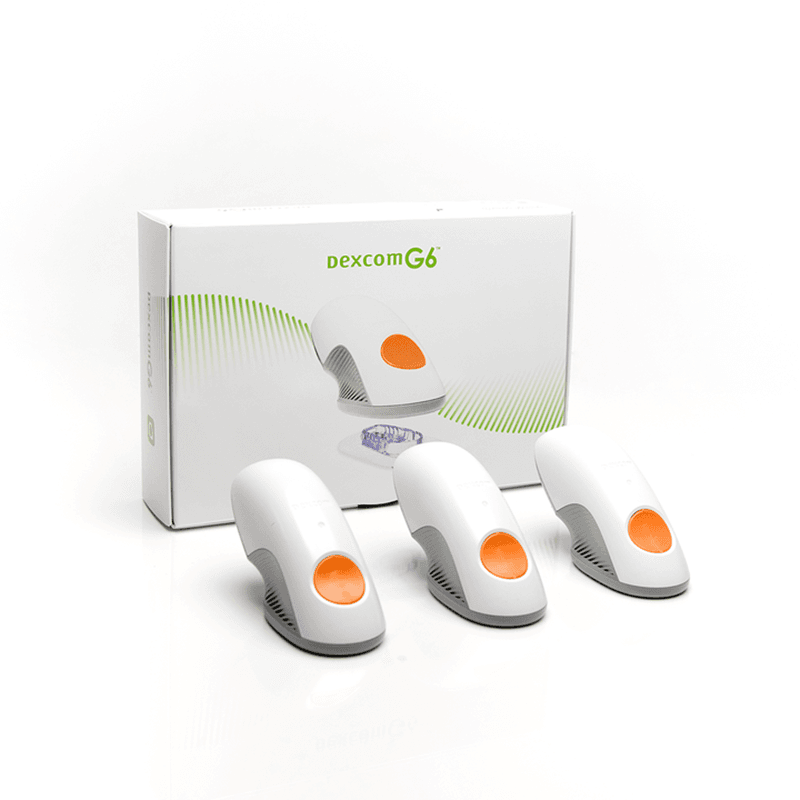
Dexcom G6 Sensor 3
Buy Dexcom G6 Sensor 3 Online


Dexcom G6 Sensor 3 is a wearable continuous glucose monitoring sensor for people using the Dexcom G6 system. Buy Dexcom G6 Sensor 3 online by choosing the sensor quantity shown during ordering and matching it to your current G6 setup, replacement schedule, and clinician directions. The sensor works with a compatible G6 transmitter and display device to provide glucose readings during each sensor session.
This sensor is one component of a continuous glucose monitoring system, not a stand-alone glucose meter or treatment. It is placed under the skin with an applicator, measures glucose in interstitial fluid, and sends data through the transmitter to a compatible receiver or smart device. Current price, package contents, US delivery from Canada, and handling details should be reviewed alongside the other G6 components you already use.
Dexcom G6 Sensor 3 Price and Package Details
The Dexcom G6 Sensor 3 price should be read together with the sensor quantity, package description, and the G6 components you already have. The sensor does not replace the transmitter, receiver, compatible phone, or backup blood glucose meter. If you are paying cash, the total cost can depend on how many sensor sessions the selected quantity may cover and whether separate supplies are needed.
Many CGM expenses come from replacement timing rather than a one-time device purchase. A Dexcom G6 sensor is commonly used for up to 10 days per session when started, worn, and ended according to the manufacturer’s instructions. A multi-sensor package may cover several sessions, but it should still be planned around your prescribed monitoring routine and transmitter life.
If your paperwork includes a product identifier such as 08627 0053 03, match that number to the item name and package being ordered. Also confirm that the supply is for Dexcom G6 sensors, not a G6 transmitter, receiver, or a different Dexcom generation. This step helps prevent a common mismatch: having new sensors but no working compatible transmitter.
| Detail to Match | Why It Matters |
|---|---|
| Product name or code | Helps align the item with device records, pharmacy paperwork, or clinician instructions. |
| Sensor quantity | Shows how many sensor sessions the package may support. |
| G6 transmitter status | The sensor needs a working transmitter to send glucose data. |
| Display device | Readings require a compatible receiver or smart device app. |
| Package condition | Damaged, opened, or expired supplies should not be started. |
Quick tip: Check the transmitter replacement date before ordering sensors, because the two components have different use cycles.
How to Order Online
Order Dexcom G6 Sensor 3 online by choosing the sensor quantity that matches your supply needs, entering the requested customer information, and reviewing the order summary before checkout. We may review order details when needed to help ensure the request matches the item being purchased. If delivery details are required, enter the name, address, and contact information carefully so any handling question can be resolved before shipment.
For cross-border service, use the delivery choices shown during checkout rather than assuming every product follows the same route. Dexcom G6 Sensor 3 from Canada may be part of a US shipping from Canada order when that service is offered for the item. Keep the product name, quantity, and shipping address consistent across the order so the supply can be processed without avoidable delays.
Before payment, review the complete monitoring setup: sensor, transmitter, receiver or phone app, charger, and backup meter supplies. Sensors from one generation should not be treated as universal parts. A G6 sensor is intended for the G6 system and should not be mixed with G7 components unless a clinician has changed the entire monitoring plan and the manufacturer’s instructions support the new setup.
What the Sensor Does in the G6 System
Dexcom G6 sensors continuously monitor glucose trends for people managing diabetes. The sensor sits just under the skin and measures glucose in interstitial fluid, which is the fluid between cells. The transmitter then sends glucose data to a compatible display device, where the user can see current readings, trend arrows, and alerts if those features are configured.
The device many people notice on a person’s arm or abdomen may be a CGM sensor and transmitter. It is not insulin and does not deliver medication. It helps display glucose information so the user and clinician can make informed decisions about food, activity, diabetes medicines, and safety planning.
CGM readings can reduce routine fingerstick testing for some users when the system is working as directed and symptoms match the displayed number. A standard meter still matters when readings are missing, seem inaccurate, or do not fit how the person feels. For broader background on meters and sensors, see diabetes articles and the diabetes condition section.
Dexcom G6 data may support better glucose awareness, but the sensor itself does not lower A1C, treat high glucose, or rescue low glucose. Any change in A1C depends on the full diabetes plan, including treatment decisions, monitoring habits, nutrition, activity, illness, and follow-up care. Do not ignore symptoms because a CGM screen looks reassuring.
Compatibility: Sensor, Transmitter, and Display
Dexcom G6 Sensor 3 should be matched with the Dexcom G6 system. The sensor is inserted with its applicator, the transmitter snaps into the sensor, and the display device receives the data. Without a compatible transmitter and display, the sensor cannot provide usable readings.
- Sensor: worn on the body and used for a limited sensor session.
- Transmitter: attaches to the sensor and sends glucose data.
- Display: may be a compatible Dexcom receiver or supported smart device.
- Backup meter: confirms blood glucose when CGM data is unavailable or questionable.
Do not assume Dexcom G6 and Dexcom G7 supplies can be combined. Different generations may use different sensors, transmitter arrangements, apps, receivers, and setup steps. If your clinician changes the CGM system, review every component before replacing only the sensor.
Why it matters: A correct sensor cannot provide readings if the transmitter is expired, absent, or incompatible.
Setup, Wear Time, and Daily Handling
Follow the instructions supplied with the sensor and the directions from the clinician managing diabetes care. Dexcom G6 startup usually occurs through the compatible receiver or app. The process may involve entering or scanning a sensor code when the device asks for it, then waiting for the system to complete its startup process.
Each sensor session has a limited wear period. Dexcom G6 sensors are commonly used for up to 10 days when applied and worn as directed. If the package contains more than one sensor, plan the quantity around the replacement schedule rather than treating the box as a single long-lasting device.
Good skin preparation can improve adhesion and comfort. Apply the sensor to clean, dry skin, and avoid lotions, oils, or heavy adhesive residue at the site unless your clinician has recommended a specific barrier method. Rotate sites as directed, and avoid areas that may be pressed by waistbands, belts, or sleep position.
During wear, protect the sensor from being pulled, compressed, or bumped. Pressure on the sensor site can sometimes affect readings, especially overnight or under tight clothing. If adhesive loosens, readings stop, the site becomes painful, or the applicator does not work as expected, follow the manufacturer’s troubleshooting instructions and contact a healthcare professional when symptoms or skin concerns are significant.
Storage, Travel, and Package Checks
Store Dexcom G6 sensors according to the temperature range and handling instructions printed on the package. Device supplies should not be handled as though they follow insulin storage rules. Avoid freezing, overheating, excessive moisture, direct sun, and leaving sensors in a vehicle.
Inspect each sensor package before starting a new session. Do not use a package that is opened, punctured, damaged, expired, or visibly compromised. If the sensor has been exposed to temperature extremes or the applicator looks damaged, ask a healthcare professional or the manufacturer’s support channel before use.
Travel planning should include more than the sensor itself. Carry compatible G6 components, a charged display device or receiver, backup meter supplies, fast-acting carbohydrate if recommended, and enough monitoring supplies for delays. Keep supplies accessible during travel because checked luggage, heat exposure, or lost bags can interrupt glucose monitoring.
Security screening rules can vary by airport, facility, and country. Carrying the product label or a clinician note may help explain CGM supplies. Follow current Dexcom instructions for scanners, X-rays, MRI, CT, and other equipment that may affect safe device use.
Safety Checks, Interferences, and When to Use a Meter
CGM readings are useful only when the system is working correctly and the user responds safely. If glucose symptoms do not match the displayed reading, use a blood glucose meter and follow the safety plan provided by the clinician. A meter check is also important when the screen shows no number, no trend arrow, repeated signal loss, or an error message.
Do not ignore signs of hypoglycemia or hyperglycemia because a CGM reading appears normal. Low glucose may cause shakiness, sweating, hunger, confusion, weakness, seizure, or loss of consciousness. High glucose may cause thirst, frequent urination, nausea, abdominal pain, fruity breath, or rapid breathing, especially if ketones are present.
Some medicines and procedures can interfere with safe Dexcom G6 use. Higher-than-recommended acetaminophen exposure may cause falsely high G6 readings, and hydroxyurea may also affect accuracy. The sensor and transmitter should not be worn during MRI, CT scan, or diathermy procedures unless current manufacturer instructions clearly allow it.
Skin reactions can occur under the adhesive or at the insertion site. Watch for increasing redness, swelling, warmth, drainage, bleeding that does not stop, or pain that worsens after insertion. These concerns should be discussed with a healthcare professional, especially for people with sensitive skin, infection risk, poor wound healing, or a history of adhesive reactions.
Backup Supplies and Diabetes Monitoring Planning
A CGM can reduce fingersticks for some users, but it should not remove the need for backup supplies. Keep a working blood glucose meter, test strips, lancets, and control solution if those are part of the care plan. Backup checks are especially important during illness, sensor startup, rapidly changing glucose, unexpected symptoms, or device problems.
People using continuous monitoring often still need other diabetes supplies for daily care. The diabetes supplies category can help you browse monitoring-related items without confusing sensors, transmitters, receivers, and meter products. For a broader treatment and supply view, the diabetes product category groups related diabetes items in one place.
Low glucose planning should be in place before relying on any monitoring device. Keep fast-acting carbohydrate or prescribed rescue treatment available when recommended. Ask your clinician when a meter reading, ketone test, urgent care visit, or medication adjustment is needed rather than making changes based only on a sensor trend.
Related G6 and CGM Decisions
People ordering Dexcom G6 sensors often compare sensor quantity, transmitter status, receiver compatibility, smartphone app support, and backup meter supplies. The sensor and transmitter are easy to confuse because they work together at the same site, but they have different replacement schedules and different roles in the system.
If you are moving from G6 to another Dexcom generation, treat it as a system change rather than a simple sensor replacement. G7 supplies may use different hardware and setup steps. Confirm the display device, app, transmitter requirements, and clinician instructions before ordering replacement supplies for a new generation.
If insulin, oral diabetes medicine, glucagon, ketone testing, or nutrition planning is part of your care plan, those decisions should be reviewed separately. Monitoring supplies show glucose information; they do not treat high or low glucose by themselves. Product choice should fit the complete diabetes plan rather than only the sensor package.
Authoritative Sources
Use the official Dexcom G6 instructions, package labeling, and clinician directions as the primary references for insertion, startup, alerts, medication interference, and replacement timing. Manufacturer instructions may change as device compatibility, warnings, and support timelines are updated.
Helpful source references include the Dexcom G6 CGM system information and the Dexcom sensor change instructions. These sources should be used together with the instructions included in the package and the monitoring plan set by your clinician.
This content is for informational purposes only and is not a substitute for professional medical advice.
Blood Glucose Unit Converter
Convert glucose readings between mg/dL and mmol/L without changing the clinical value.
mg/dL
-
US reporting unit
mmol/L
-
International reporting unit
These calculations are for education only and do not replace clinical advice, diagnosis, or treatment. Always confirm medical decisions with a qualified healthcare professional.
HbA1c & eAG Calculator
Convert between HbA1c percentage and estimated average glucose using the ADAG relationship.
HbA1c
-
percentage
eAG mg/dL
-
estimated average glucose
eAG mmol/L
-
estimated average glucose
These calculations are for education only and do not replace clinical advice, diagnosis, or treatment. Always confirm medical decisions with a qualified healthcare professional.
CGM Time-in-Range Summary
Summarise CGM percentages across very low, low, in-range, high, and very high glucose bands.
Entered total
-
should equal 100%
Below range
-
very low plus low
Above range
-
high plus very high
Summary
-
common adult CGM targets vary by patient
These calculations are for education only and do not replace clinical advice, diagnosis, or treatment. Always confirm medical decisions with a qualified healthcare professional.
Carb Serving Calculator
Convert total carbohydrate grams into carb choices for meal planning and diabetes education.
Carb choices
-
total carbs divided by choice size
Rounded choices
-
nearest half choice
Carb calories
-
4 kcal per gram
These calculations are for education only and do not replace clinical advice, diagnosis, or treatment. Always confirm medical decisions with a qualified healthcare professional.
Glycaemic Load Calculator
Calculate glycaemic load from glycaemic index and available carbohydrate in a serving.
Glycaemic load
-
GI x carbs / 100
Range
-
single serving estimate
Total carbs used
-
serving carbs x servings
These calculations are for education only and do not replace clinical advice, diagnosis, or treatment. Always confirm medical decisions with a qualified healthcare professional.
Express Shipping - from $29.99
Prices:
- Dry-Packed Products $29.99
- Cold-Packed Products $39.99
Standard Shipping - $19.99
Shipping with this method takes 5-10 days
Prices:
- Dry-Packed Products $19.99
- Not available for Cold-Packed products
What is Dexcom G6 Sensor 3 used for?
Dexcom G6 Sensor 3 is used as part of the Dexcom G6 continuous glucose monitoring system. It measures glucose in interstitial fluid and works with a compatible transmitter and display device to show glucose readings, trends, and alerts.
Does the Dexcom G6 sensor work without a transmitter?
No. The sensor does not work alone. A compatible Dexcom G6 transmitter must attach to the sensor and send glucose data to a compatible receiver or smart device.
How long can a Dexcom G6 sensor be worn?
Dexcom G6 sensors are commonly used for up to 10 days per sensor session when started and worn according to the manufacturer’s instructions. Follow the device prompts and package directions for sensor changes.
Can Dexcom G6 replace fingerstick blood sugar checks?
It may reduce routine fingersticks for some users when the system is working as directed and symptoms match the reading. Use a blood glucose meter when readings are missing, seem wrong, or do not match how you feel.
Why is acetaminophen mentioned with Dexcom G6?
Higher-than-recommended acetaminophen exposure may cause falsely high Dexcom G6 readings. Ask a healthcare professional how to handle glucose decisions if you take acetaminophen or any medicine that may affect CGM accuracy.
Does Dexcom G6 lower A1C by itself?
No. Dexcom G6 is a monitoring system, not a treatment. It may support diabetes management by showing glucose trends, but A1C changes depend on the full care plan and how the information is used.
Rewards Program
Earn points on birthdays, product orders, reviews, friend referrals, and more! Enjoy your medication at unparalleled discounts while reaping rewards for every step you take with us.
You can read more about rewards here.
POINT VALUE
How to earn points
- 1Create an account and start earning.
- 2Earn points every time you shop or perform certain actions.
- 3Redeem points for exclusive discounts.
You Might Also Like
Select options
This product has multiple variants. The options may be chosen on the product page
Select options
This product has multiple variants. The options may be chosen on the product page
Select options
This product has multiple variants. The options may be chosen on the product page
Select options
This product has multiple variants. The options may be chosen on the product page