
Shipping with this method takes 3-5 days
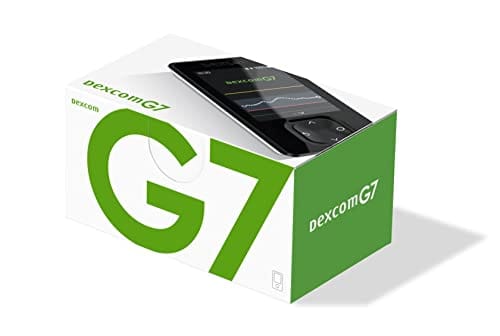
Dexcom G7 Receiver
Dexcom G7 Receiver Uses and Safety Overview
Price:
$99.99
You save


The Dexcom G7 Receiver is a handheld display used with the Dexcom G7 continuous glucose monitoring system to view glucose readings, trends, and alerts. It can be an option for people who prefer a dedicated device rather than using a smartphone. This page summarizes how the receiver works, practical handling basics, and safety considerations to review with a clinician.
What Dexcom G7 Receiver Is and How It Works
This receiver is a standalone display that communicates with a compatible CGM sensor system to show glucose values, trend information, and customizable alerts. CanadianInsulin facilitates prescription referral and may confirm details with your prescriber. Some patients explore US shipping from Canada when obtaining diabetes supplies, depending on eligibility and jurisdiction. In day-to-day use, the receiver’s role is to present incoming data clearly and support recognition of patterns over time.
The device typically shows a current glucose reading plus direction-of-change information (trend) and can store historical data for review on-screen. Alerts may be used to notify users of out-of-range values or rapid changes, which can support safer monitoring when configured appropriately. Because CGM measures glucose in interstitial fluid (the fluid between cells), readings can lag behind fingerstick blood glucose during rapid changes; this is a normal limitation of the measurement method and is addressed in the product instructions. For broader context on diabetes management topics and related supplies, browse the Diabetes Hub.
Who It’s For
A dedicated receiver may be useful for people who use the Dexcom G7 system and want a separate, purpose-built display. This can include individuals who do not have a compatible smartphone, prefer to keep diabetes tools separate from personal devices, or need an always-on screen in certain daily routines. In some settings, families and caregivers also use a receiver to simplify monitoring workflows, though the exact sharing and account options depend on the system configuration and applicable privacy rules.
Dexcom G7 Receiver use is generally tied to the underlying CGM system’s labeling and prescription requirements, which can vary by jurisdiction. It is not a treatment for diabetes by itself; it is a monitoring accessory that supports decision-making with a care plan. People with vision, dexterity, or hearing considerations may want to review display size, alert volume, and accessibility settings with a clinician. For a browsable list of related items, see Diabetes Products.
Dosage and Usage
Because this is a device rather than a medicine, there is no dose. Use centers on setup, pairing, and regular review of glucose data. Typical steps include charging the device, completing initial configuration (date/time, units, and alert preferences), and pairing it with the CGM sensor system according to the manufacturer instructions. Many systems require starting a new sensor session and waiting through a warm-up period before readings display.
With the Dexcom G7 Receiver, alert thresholds and notifications should align with goals set with a diabetes clinician, especially for people at risk of hypoglycemia (low glucose). If symptoms do not match the displayed value, the label may recommend confirming with a fingerstick meter and taking action based on clinical guidance. Keep the user guide available so you can follow the manufacturer’s troubleshooting steps for pairing problems, signal loss, or missed alerts. For other monitoring tools and accessories, you can browse Diabetes Supplies.
Strengths and Forms
The receiver is a handheld electronic display designed to be carried throughout the day. It is typically rechargeable and built for frequent, short check-ins rather than continuous screen-on use. Interface features commonly include a touchscreen or button navigation, a backlit display for low-light viewing, and audible or vibration alerts, though exact features can differ by version and region.
Presentation may vary: some patients receive the receiver as part of a starter package, while others obtain it as a standalone item or as a replacement. Accessory needs can also vary by lifestyle, such as a protective case for daily wear or a reliable charging setup for travel. For accuracy and safety, rely on the manufacturer’s included documentation for what is in the box and what is compatible with the specific system version.
Storage and Travel Basics
Store the receiver in a clean, dry place and protect it from drops, crushing pressure, and water exposure. Avoid leaving the device in very hot or very cold environments, such as a car in summer or winter, because temperature extremes can affect battery performance and screen function. If the receiver gets wet, follow the manufacturer instructions before using it again.
For travel, plan for regular charging and keep the device accessible rather than in checked luggage when possible. Keep serial numbers and support information available in case the device is lost.
Quick tip: If you use multiple diabetes devices, label chargers to avoid mix-ups.
For additional educational resources on diabetes topics, browse Diabetes Articles.
Side Effects and Safety
The receiver itself does not contact the skin, so direct physical side effects are uncommon. Safety issues more often relate to how CGM data are interpreted and acted on. For example, alarm fatigue can occur if alerts are set too frequently, and missed alerts can occur if volume settings are low or the device is out of range. Using any CGM display also requires awareness that sensor glucose can lag behind blood glucose during rapid changes.
With the Dexcom G7 Receiver, follow label guidance for situations when a confirmatory fingerstick may be needed, such as when symptoms do not match the reading or when a reading seems unexpected.
Why it matters: Confirming a mismatched reading can reduce the risk of inappropriate corrective actions.
Also watch for issues tied to the sensor system, such as adhesive-related skin irritation or sensitivity, and discuss persistent reactions with a clinician. If you are reviewing how medication safety information is typically presented in this site’s library, examples include What Is Onsior.
Drug Interactions and Cautions
There are no classic drug interactions for the receiver because it is not a medication. However, CGM systems can have “interfering substances” (chemicals or medications that may affect sensor readings) listed in labeling. If you take regular over-the-counter medicines or receive medical dyes or infusions, it is important to check the specific Dexcom G7 documentation for any known interferences and recommended precautions.
Medical procedures and environments can also matter. Imaging and energy-based procedures (for example MRI, CT, diathermy, or electrocautery) may have restrictions for the sensor system, and the receiver should be handled according to the manufacturer’s safety instructions for that procedure. If you manage medications for other household members, the site’s veterinary explainers may be useful examples of risk-and-side-effect framing, such as Apoquel For Dogs and End The Scratching.
Compare With Alternatives
A receiver is one way to view CGM readings, but it is not the only option. Many CGM systems support smartphone apps that show glucose data and allow notifications, which may reduce the number of devices you carry. A phone-based setup may be limited by operating system requirements, battery drain, workplace restrictions, or personal preference, so a dedicated handheld display can still be appropriate for some users.
Other alternatives include different generations of Dexcom receivers (when compatible with the sensor system) or other CGM brands with their own readers. Differences can include alert behavior, display layout, data-sharing options, and accessibility features. When comparing, focus on compatibility, safety features you will actually use, and how data will be shared with your clinical team. For additional background reading format examples within the site’s library, see Atopica Cats Medication.
Pricing and Access
Coverage and access for CGM receivers vary widely. Depending on the plan and jurisdiction, the receiver may be treated as durable medical equipment, a pharmacy benefit item, or an out-of-pocket purchase. Dispensing is completed by licensed third-party pharmacies where permitted by local rules. Requirements can include a valid prescription, current patient information, and confirmation that the receiver is intended for use with the appropriate CGM system.
For people paying cash or obtaining a receiver without insurance, the total expense can depend on whether the receiver is needed as a replacement, whether a starter bundle is required, and whether accessories are needed for daily use. Documentation requests can also differ between payers and regions, especially when a receiver is prescribed due to phone incompatibility or accessibility needs. Cross-border fulfilment may be considered for eligible patients, depending on jurisdiction. If you are looking for general updates that may affect the checkout total for some items, see the Promotions Page.
Access decisions are best made with a clinician who understands your monitoring goals and safety needs, including how alerts should be set and when confirmatory testing is appropriate. Keeping model numbers, serial information, and a record of prior CGM use can help reduce back-and-forth when a prescription is renewed or updated. For more general education on diabetes management and monitoring, the Diabetes Articles hub is a useful starting point.
Authoritative Sources
The most reliable details for setup, compatibility, and safety come from manufacturer documentation and regulatory or clinical organizations that publish CGM guidance. Use the official materials to confirm what features are available in your region, how alerts behave, and what to do when readings do not match symptoms. If anything in the instructions is unclear, bring the specific wording to your diabetes clinician for interpretation in the context of your care plan.
For additional reference, these sources provide general CGM and diabetes-device context:
- General device safety information is available from the FDA Medical Devices.
- Diabetes technology resources are provided by the American Diabetes Association.
- Diabetes condition education is available through the National Institute of Diabetes and Digestive and Kidney Diseases.
When prescriptions are referred and dispensed where permitted, delivery logistics may include prompt, express, cold-chain shipping if temperature control is required.
This content is for informational purposes only and is not a substitute for professional medical advice.
Express Shipping - from $25.00
Prices:
- Dry-Packed Products $25.00
- Cold-Packed Products $35.00
Standard Shipping - $15.00
Shipping with this method takes 5-10 days
Prices:
- Dry-Packed Products $15.00
- Not available for Cold-Packed products
What does a CGM receiver do compared with a phone app?
A CGM receiver is a dedicated handheld display that shows glucose readings, trends, and alerts from a compatible sensor system. Compared with a phone app, it can reduce reliance on phone battery life, operating system updates, and notification settings that may silence alerts. A receiver may also be helpful when a smartphone is not compatible or not permitted in certain environments. Features differ by system and region, so it helps to review the user guide for alert behavior, data history, and any sharing options.
Is the Dexcom G7 Receiver compatible with all Dexcom G7 sensors?
Compatibility is generally intended within the Dexcom G7 system, but details can vary by region, software version, and packaging. Some components may have specific pairing rules or update requirements. It is important to check the product labeling and user documentation that come with your system and to confirm that the receiver you have matches the G7 platform used by your prescriber’s plan. If you are replacing a receiver, keep model and serial information available to avoid mismatches.
How do I set glucose alerts on the receiver?
Alert setup usually occurs during initial configuration and can be adjusted later in the settings menu. Common options include high and low glucose alerts, urgent low alerts, and notifications for signal loss. The safest approach is to follow the manufacturer’s instructions and align alert thresholds with goals discussed with a diabetes clinician, especially for children, older adults, or anyone with hypoglycemia unawareness. If alerts feel too frequent or too quiet, review volume, vibration, and do-not-disturb settings as described in the guide.
When should I confirm a CGM reading with a fingerstick meter?
Many CGM systems recommend confirmatory fingerstick testing in certain situations, such as when symptoms do not match the displayed glucose value, when the reading seems unexpected, or when rapid changes are occurring. Because CGM measures glucose in interstitial fluid, readings can lag behind blood glucose during fast rises or drops. Your clinician can advise how to incorporate confirmatory testing into your monitoring plan. Always follow the device labeling and your care plan for treating suspected low or high glucose.
How often do I need to charge the receiver?
Charging frequency depends on display use, alert volume, screen brightness, and how long the device is kept active each day. Most users charge on a routine schedule that fits their day-to-day habits, such as overnight or during quiet periods. If the receiver is not charging, check the cable and power source, inspect the charging port for debris, and follow the manufacturer’s troubleshooting steps. If the battery seems to drain unusually fast, document the pattern and discuss it with support or your clinician.
Can I travel with the receiver and use it in airports?
Many people travel with CGM devices, but rules can vary by airport and country. Keep the receiver accessible, bring charging supplies, and carry documentation for the CGM system if you have it. Security screening procedures may differ for the sensor and any other wearable components; follow the manufacturer’s travel guidance for screening methods and device exposure. Time zone changes can affect timestamped data, so review device time settings after arrival according to the user instructions.
What should I ask my clinician before starting CGM with a receiver?
Useful topics include what glucose ranges and alerts are appropriate for your situation, how to respond to urgent low or high alerts, and when fingerstick confirmation is recommended. Ask how CGM data will be reviewed in follow-up visits and whether sharing features are needed for caregivers. It can also help to discuss skin sensitivity concerns related to adhesives, how to handle readings that do not match symptoms, and what to do during illness or procedures that may affect device use. Bring your current medication list and monitoring goals to the discussion.
Rewards Program
Earn points on birthdays, product orders, reviews, friend referrals, and more! Enjoy your medication at unparalleled discounts while reaping rewards for every step you take with us.
You can read more about rewards here.
POINT VALUE
How to earn points
- 1Create an account and start earning.
- 2Earn points every time you shop or perform certain actions.
- 3Redeem points for exclusive discounts.
You Might Also Like
Select options
This product has multiple variants. The options may be chosen on the product page
Select options
This product has multiple variants. The options may be chosen on the product page
Select options
This product has multiple variants. The options may be chosen on the product page
Select options
This product has multiple variants. The options may be chosen on the product page
Related Articles
Type 2 Diabetes,
Oral Wegovy Explained: Facts, Risks, and Access Options
The phrase oral wegovy is best understood as a search term, not a settled product name. Most people use it to mean a pill version of semaglutide for weight management,…
Diabetes, General Health,
Glp-1 Drugs Over The Counter: What’s Real And What’s Not
Key Takeaways Prescription GLP-1 medicines are not sold as true OTC drugs. Many “GLP-1” supplements aim to support fullness, not mimic prescriptions. Online “no prescription” offers raise counterfeit and quality…
Diabetes, Type 2
GLP-1 Cost Without Insurance: Compare Cash-Pay Options
Key Takeaways Many people searching for glp-1 cost without insurance are trying to plan for a long-term expense. The total can change based on the drug, the pharmacy, and how…
Cardiovascular, Diabetes, Nephrology,
SGLT2 Inhibitors Drugs: Names, Uses, And Safety Notes
Key Takeaways They lower glucose by increasing urinary sugar loss. Common options include dapagliflozin, empagliflozin, canagliflozin, and ertugliflozin. Some products combine an SGLT2 inhibitor with metformin. Risks include dehydration and…