
Shipping with this method takes 3-5 days
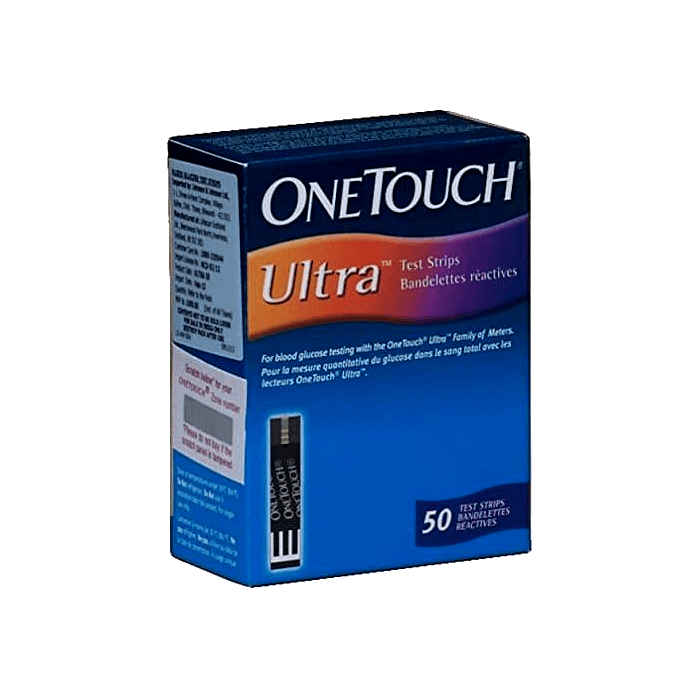
OneTouch Ultra Test Strips
Buy OneTouch Ultra Test Strips Online


OneTouch Ultra Test Strips are blood glucose test strips used with compatible OneTouch Ultra meters for home blood sugar monitoring. You can buy OneTouch Ultra Test Strips online, view the current price, and choose the quantity shown during ordering. Match the strip name to your meter instructions and your clinician-directed testing routine before opening a new box or vial.
OneTouch Ultra Test Strips Price and Quantity Choices
The OneTouch Ultra Test Strips price should be read together with the total strip count in the order. Blood glucose test strips are single-use supplies, so the number of strips affects both the checkout total and how long the supply may last. A larger quantity may be practical for frequent testing, but it should still fit your expected use and the expiry dating on the product received.
Some customers search by pack sizes such as OneTouch Ultra Test Strips 50 count, 100 count, or 120 count. The important buying step is to count the total number of single-use strips, not only the wording on the box. If a carton name includes OneTouch Ultra Blue Test Strips or another naming variation, match the exact strip wording to your meter guide before use.
Cash-pay and without-insurance ordering should be evaluated by the current product price, quantity, and meter compatibility. A cash price may differ from an insurance-based pathway, so keep your meter model and usual testing schedule available when planning supply needs. US delivery from Canada may be part of the service context for some orders, so confirm the quantity and handling information shown at checkout.
| What to Compare | Why It Matters |
|---|---|
| Quantity | Shows how many single-use strips are included. |
| Meter family | Helps avoid buying strips your meter cannot read. |
| Expiry dating | Supports safe use before the manufacturer date passes. |
| Package condition | Damaged or opened packaging can affect strip reliability. |
Quick tip: Match the wording on your current vial to the wording on the new carton.
If you need to compare strip families before choosing, browse the test strips collection. The broader diabetes supplies category can also help you review related monitoring items, including meters, lancets, and other home-testing supplies.
How to Order Online
Start by choosing OneTouch Ultra Test Strips in the quantity that fits your testing plan and expiry window. Confirm the strip name, meter family, and customer information before checkout. Do not rely on an older box if your meter has changed, because OneTouch meter families can use different strips.
For US shipping from Canada, make sure the strip count and contact details are accurate before the order is placed. Prompt, express, cold-chain shipping language may appear across pharmacy services, but test strips are usually managed around dry, sealed packaging and temperature protection rather than insulin-style refrigeration. Review the carton on arrival and keep unopened supplies in their original packaging until needed.
- Choose the strip name: Match it to the meter instructions.
- Choose the quantity: Estimate use before the expiry date.
- Check your meter: Use the full model name, not only the brand.
- Keep records nearby: Have your testing routine and meter guide available.
Before opening a vial, inspect the seal, carton condition, lot information, and expiry date. If the strip name does not match your meter guide, use a compatible product instead of trying to adapt strips from another device family. A mismatch can cause meter errors or readings that should not be used for treatment decisions.
Meter Compatibility and Pack Counts
OneTouch Ultra Test Strips are intended for compatible OneTouch Ultra meters, including OneTouch Ultra 2 when that meter’s instructions list them. Many shoppers use the phrase OneTouch Ultra 2 Test Strips because the meter model is the deciding factor. A OneTouch meter does not automatically work with every OneTouch test strip.
OneTouch Ultra Plus Test Strips, OneTouch Verio strips, and other OneTouch blood glucose test strips are separate product families unless a meter guide specifically states compatibility. Similar branding can be confusing because the strips may look alike and serve the same general purpose. The practical rule is simple: the strip label, vial label, and meter instructions must agree.
Pack count does not prove compatibility. A 50-count, 100-count, 120-count, or other quantity only tells you how many strips are included. The device still needs the correct strip chemistry and physical fit to generate a dependable reading.
| Detail | Customer Check |
|---|---|
| Meter name | Compare the full model name in the user guide. |
| Strip label | Match the carton and vial wording to the meter guide. |
| Lot and expiry | Use strips within date and stored as directed. |
| Control solution | Use it when the meter instructions recommend a system check. |
Why it matters: The correct strip and meter pairing supports more dependable home glucose monitoring.
What These Strips Are Used For
OneTouch Ultra Blood Glucose Test Strips are monitoring supplies used with a compatible meter to measure glucose in a small blood sample, often from a fingertip. They are not diabetes medicines and do not lower blood sugar. The reading can help you follow a testing plan, track patterns, and discuss results with a healthcare professional.
People living with type 1 diabetes, type 2 diabetes, gestational diabetes, or other glucose-monitoring needs may use diabetes test strips as part of routine care. Testing frequency can vary by insulin use, oral medications, meals, physical activity, illness, pregnancy, and risk of hypoglycemia. Do not change diabetes medication, food intake, or testing frequency based only on supply information.
Home glucose readings are most useful when they are recorded in a consistent way. Many people write down the date, time, reading, symptoms, meals, exercise, and medication timing. Your clinician may ask for meter memory, a logbook, or app records when adjusting a diabetes care plan.
For general condition context, the diabetes information section covers broader diabetes topics. Product selection still depends on the specific meter and strip instructions you use at home.
Storage, Handling, and Travel
Test strips can be affected by moisture, heat, cold, contamination, and expired dating. Keep strips in the original vial or sealed packaging unless the manufacturer instructions say otherwise. Close the cap promptly after removing one strip, and do not move strips into a pill box, plastic bag, or unmarked container.
Store the product within the temperature range printed on the carton or vial. Bathrooms, hot cars, damp kitchens, and direct sunlight are poor storage locations because strip performance can be affected by moisture and temperature changes. If a vial has been left open, exposed to liquid, or stored outside the recommended range, follow the product instructions before relying on a reading.
For travel, keep glucose monitoring supplies in carry-on luggage when possible. Pack enough strips for the trip and a reasonable backup supply, while also considering expiry dates. Bring the compatible meter, lancets, spare batteries, control solution if recommended, and written testing instructions if your clinician has provided them.
Airport screening, schedule changes, missed meals, illness, or unexpected activity can make organized supplies especially important. Keep strips dry and sealed during travel. If a reading seems inconsistent with how you feel, repeat the test according to the meter instructions and consider whether storage or handling could have affected the strip.
Safety, Accuracy, and When to Get Help
Glucose meter readings depend on the strip, meter, blood sample, and testing technique. Wash and dry hands before testing unless your meter instructions provide another method. Food residue, lotion, alcohol, an insufficient blood drop, or squeezing the finger too hard can affect results.
Fingerstick testing may cause brief pain, small bruises, or skin irritation. Use a clean lancet, change lancets as directed, and dispose of sharps safely. If a puncture site becomes red, swollen, warm, or painful, contact a healthcare professional.
An unexpected reading should be handled according to your diabetes plan and meter instructions. Retesting may be appropriate when the number does not match your symptoms or recent activity. Control solution can help check the meter-and-strip system when the user guide recommends it, especially after dropped meters, new vials, or unusual readings.
Symptoms of low blood sugar can include shaking, sweating, hunger, weakness, confusion, or fainting. Very high glucose may cause intense thirst, frequent urination, nausea, vomiting, abdominal pain, deep breathing, or drowsiness. Seek urgent medical help for severe symptoms, loss of consciousness, or any situation your care plan identifies as an emergency.
Some medical conditions, sample issues, or interfering substances may affect certain meter systems. The meter user guide is the best source for device-specific limitations and error messages. Do not use a home glucose reading as the only basis for changing insulin, diabetes tablets, food intake, or emergency treatment unless that action is part of a clinician-provided plan.
Testing Routine and Supply Planning
The best time to check glucose is different for each person. Some people test fasting, before meals, after meals, before driving, before exercise, at bedtime, or when symptoms occur. Your clinician may adjust timing based on medication type, A1C goals, hypoglycemia risk, pregnancy status, kidney function, illness, or recent treatment changes.
When choosing a quantity, estimate how many strips your current routine may use before the expiry date. Someone testing several times daily may need a different supply than someone testing occasionally. A change in insulin use, meal plan, illness, or continuous glucose monitor instructions can also change how many fingerstick checks are needed.
- Testing frequency: Ask how often to test and at what times.
- Target ranges: Confirm which readings require action.
- Retesting steps: Ask what to do after an unexpected result.
- Supply planning: Decide how many backup strips are reasonable.
- Record keeping: Ask how readings should be shared.
Bring your meter or a photo of the model name to appointments if you are unsure which strips to use. If you use a continuous glucose monitor, ask whether fingerstick checks are still needed for symptoms, calibration, or treatment decisions. Some CGM systems require meter confirmation in specific situations.
Related Diabetes Monitoring Supplies
OneTouch Ultra Test Strips are not a universal substitute for other glucose meter test strips. If your device is a different OneTouch model, choose the strip named in that meter’s user guide. The same principle applies to Accu-Chek, Contour, FreeStyle, and other glucose monitoring systems.
A complete home testing setup usually includes the correct strip, a compatible meter, a lancing device, lancets, safe sharps disposal, and a way to record readings. Some meter systems also use control solution for performance checks. The broader diabetes product category can help you browse supplies used in diabetes care.
Lancets and lancing devices affect comfort and sample quality, even though they are separate from test strips. A lancet that does not fit the lancing device can make testing difficult or unsafe. Storage cases, spare batteries, and organized logs can also support consistent monitoring.
For education beyond product selection, the diabetes articles category includes general diabetes topics. Separate article categories for type 1 diabetes and type 2 diabetes may help you prepare questions for your care team.
Authoritative Sources for Use Instructions
The product carton, vial label, and compatible meter user guide should be the primary sources for strip selection. These materials identify compatible meters, sample requirements, storage ranges, expiry instructions, control-solution procedures, and error-message explanations. Follow those instructions before relying on a glucose reading.
Clinical instructions from your healthcare professional are the main source for testing frequency, target ranges, and what to do with unusual results. Manufacturer materials support device use, but they do not replace an individualized diabetes plan. If product naming, meter compatibility, or testing technique is unclear, confirm the answer before using a reading for a care decision.
This content is for informational purposes only and is not a substitute for professional medical advice.
Blood Glucose Unit Converter
Convert glucose readings between mg/dL and mmol/L without changing the clinical value.
mg/dL
-
US reporting unit
mmol/L
-
International reporting unit
These calculations are for education only and do not replace clinical advice, diagnosis, or treatment. Always confirm medical decisions with a qualified healthcare professional.
HbA1c & eAG Calculator
Convert between HbA1c percentage and estimated average glucose using the ADAG relationship.
HbA1c
-
percentage
eAG mg/dL
-
estimated average glucose
eAG mmol/L
-
estimated average glucose
These calculations are for education only and do not replace clinical advice, diagnosis, or treatment. Always confirm medical decisions with a qualified healthcare professional.
Carb Serving Calculator
Convert total carbohydrate grams into carb choices for meal planning and diabetes education.
Carb choices
-
total carbs divided by choice size
Rounded choices
-
nearest half choice
Carb calories
-
4 kcal per gram
These calculations are for education only and do not replace clinical advice, diagnosis, or treatment. Always confirm medical decisions with a qualified healthcare professional.
Glycaemic Load Calculator
Calculate glycaemic load from glycaemic index and available carbohydrate in a serving.
Glycaemic load
-
GI x carbs / 100
Range
-
single serving estimate
Total carbs used
-
serving carbs x servings
These calculations are for education only and do not replace clinical advice, diagnosis, or treatment. Always confirm medical decisions with a qualified healthcare professional.
CGM Time-in-Range Summary
Summarise CGM percentages across very low, low, in-range, high, and very high glucose bands.
Entered total
-
should equal 100%
Below range
-
very low plus low
Above range
-
high plus very high
Summary
-
common adult CGM targets vary by patient
These calculations are for education only and do not replace clinical advice, diagnosis, or treatment. Always confirm medical decisions with a qualified healthcare professional.
Express Shipping - from $29.99
Prices:
- Dry-Packed Products $29.99
- Cold-Packed Products $39.99
Standard Shipping - $19.99
Shipping with this method takes 5-10 days
Prices:
- Dry-Packed Products $19.99
- Not available for Cold-Packed products
Are OneTouch Ultra Test Strips the same as OneTouch Verio strips?
No. OneTouch Ultra Test Strips and OneTouch Verio strips belong to different meter families unless a specific meter guide says otherwise. Match the strip name on the carton and vial to the exact meter model you use.
Can I use OneTouch Ultra Test Strips with a OneTouch Ultra 2 meter?
OneTouch Ultra Test Strips may be used with compatible OneTouch Ultra meters, including OneTouch Ultra 2 when the meter instructions list them. Always confirm compatibility in the meter user guide before using a new box or vial.
How should I choose between different strip counts?
Choose a quantity based on your testing routine, expected use before the expiry date, and the total number of single-use strips included. Pack count does not confirm meter compatibility, so check the strip name separately.
What can affect the accuracy of a blood glucose test strip reading?
Accuracy can be affected by the wrong strip, expired strips, moisture, temperature exposure, dirty or wet hands, an insufficient blood drop, or incorrect technique. Retest according to the meter instructions when a result does not match how you feel.
How should OneTouch Ultra Test Strips be stored?
Keep strips in their original vial or sealed packaging, close the cap promptly, and store them within the temperature range printed on the carton or vial. Avoid bathrooms, hot cars, direct sunlight, and damp areas.
Rewards Program
Earn points on birthdays, product orders, reviews, friend referrals, and more! Enjoy your medication at unparalleled discounts while reaping rewards for every step you take with us.
You can read more about rewards here.
POINT VALUE
How to earn points
- 1Create an account and start earning.
- 2Earn points every time you shop or perform certain actions.
- 3Redeem points for exclusive discounts.
You Might Also Like
Select options
This product has multiple variants. The options may be chosen on the product page
Select options
This product has multiple variants. The options may be chosen on the product page
Select options
This product has multiple variants. The options may be chosen on the product page
Select options
This product has multiple variants. The options may be chosen on the product page