
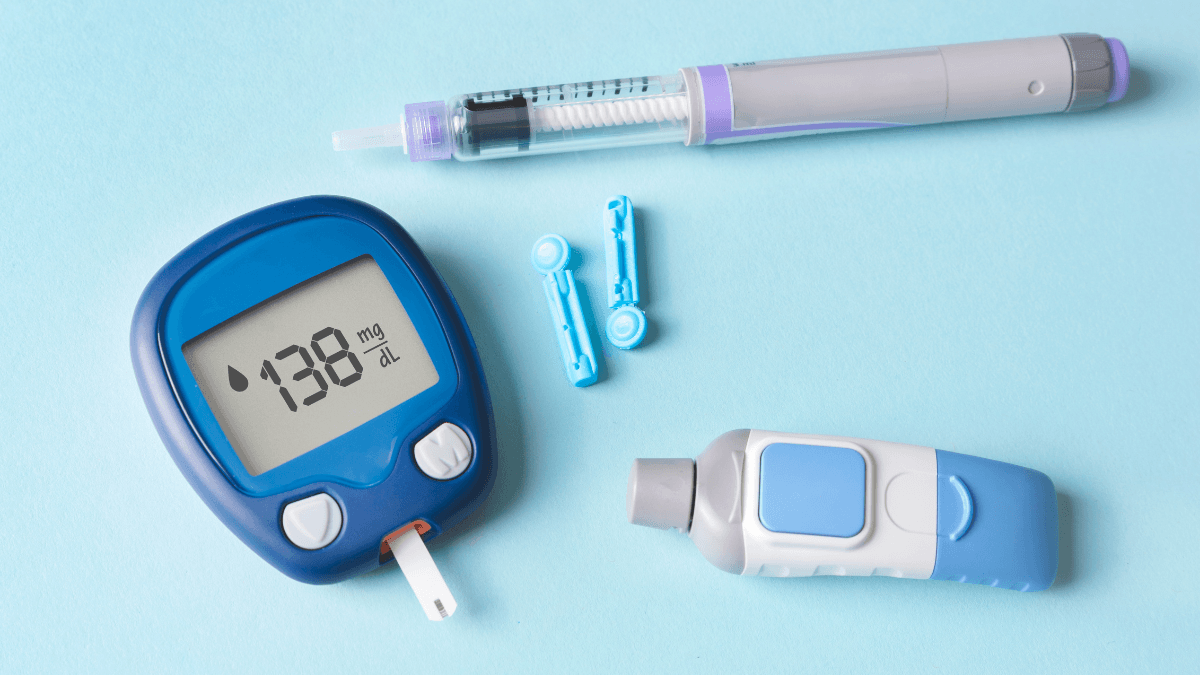
Diabetes tech is the group of devices and digital tools used to measure glucose, deliver insulin, or connect those tasks. It includes insulin pens, smart pens, pumps, continuous glucose monitoring devices, meters, apps, and automated insulin delivery systems. These tools can make patterns easier to see and some routines easier to manage, but they do not replace prescriptions, training, clinical judgment, or a safety plan.
Not every person with diabetes needs the same equipment. The right setup depends on diabetes type, insulin use, hypoglycemia risk, comfort with devices, skin tolerance, daily schedule, and access to supplies.
Key Takeaways
- Device fit matters: Choose tools around daily routines and clinical needs.
- Pens stay practical: Insulin pens deliver set doses without pump wear.
- CGMs show trends: Finger-stick checks may still be needed in some situations.
- Pumps need backup: Interrupted insulin delivery requires a clear action plan.
- Automation has limits: AID systems still need user input and oversight.
Where Diabetes Tech Fits in Daily Care
Diabetes tech usually helps with one of two jobs: checking glucose or delivering insulin. Some systems link both jobs through a sensor, pump, and algorithm. That connection can help show patterns around meals, activity, sleep, illness, stress, and medication changes.
The best starting question is not “Which device is best?” It is “What problem are you trying to solve?” A person who forgets whether they injected insulin may value a connected pen. Someone with overnight lows may need alert-based glucose monitoring. A person using multiple daily injections may compare pens, syringes, cartridges, and pump therapy with a clinician.
Technology can reduce some manual steps, but it adds new tasks. Sensors must be inserted and worn correctly. Pump infusion sites need rotation and troubleshooting. Apps require permissions, batteries, updates, and compatible phones or receivers. Data must be interpreted in context, not as isolated numbers.
Why it matters: A device is only useful when it fits real life.
If you are comparing injection and pump options, Insulin Delivery Methods gives broader context for pens, syringes, cartridges, and pumps.
Insulin Pens, Smart Pens, and Pen Needles
Insulin pens are injection devices that hold insulin in a cartridge or prefilled body. They may be used for mealtime insulin, long-acting insulin, or premixed insulin, depending on the prescribed product. A pen does not decide how much insulin to take. It delivers the dose chosen through a care plan.
Some pens are disposable after the insulin is finished. Others are reusable and accept replaceable cartridges. A reusable device such as a pen body may appeal to people who already use cartridge-based insulin, but the choice still depends on the prescribed insulin and training. Product pages such as NovoPen 4 can help readers identify device examples, but they are not a substitute for device-specific instruction.
Pen needles are separate supplies. Needle length, gauge, comfort, injection site rotation, and sharps disposal all matter. A needle that works well for one person may not suit another person’s body type, dexterity, or skin sensitivity. For more detail, see Insulin Pen Needles.
What smart pens add
Smart pens and connected caps may track dose timing, dose amount, or missed-dose patterns. Some connect with apps that show recent insulin activity. These features can help a person and clinician review habits, but they do not remove the need for a dosing plan.
Smart pens may suit people who want digital support without wearing a pump. They can also help organize basal and bolus insulin routines. Basal insulin covers background needs, while bolus insulin is used around meals or corrections as prescribed.
Continuous Glucose Monitoring Devices and Finger-Stick Limits
Continuous glucose monitoring devices estimate glucose through a small sensor worn on the skin. Many people call this a CGM device, glucose monitor patch, or wearable glucose monitor. A CGM can show current glucose, trend arrows, alerts, and reports over time.
Many readers search for a blood sugar monitor without finger pricks. A CGM may reduce routine finger-stick checks for some people, but it may not eliminate them. A meter may still be needed when symptoms do not match sensor readings, when glucose is changing quickly, when a device requests confirmation, or when a care team gives specific instructions.
CGM readings measure glucose in interstitial fluid, which is fluid between cells. That value can lag behind blood glucose during rapid changes. This matters after meals, after insulin, during exercise, and during suspected low blood sugar. Skin irritation, pressure on the sensor during sleep, placement problems, and connectivity issues can also affect the experience.
CGMs are often most useful for patterns rather than single numbers. Time in range, overnight trends, meal responses, and recurring lows can guide a discussion with a clinician or diabetes educator. For broader testing routines, see Blood Sugar Monitoring.
Some people compare a CGM with a traditional meter. Meters still have a role because they measure capillary blood glucose from a finger-stick sample. Product pages such as FreeStyle Freedom Lite Meter and Contour Next Meter show examples of meter-based tools, while a page such as Dexcom G7 Sensor shows an example of a sensor-based system.
Glucose units vary by region and device settings. This converter can help compare mg/dL and mmol/L values when reading reports or sharing numbers across systems. It is only a unit conversion tool and does not interpret whether a reading is safe for your situation.
Blood Glucose Unit Converter
Convert glucose readings between mg/dL and mmol/L without changing the clinical value.
These calculations are for education only and do not replace clinical advice, diagnosis, or treatment. Always confirm medical decisions with a qualified healthcare professional.
Pumps, Automated Delivery, and Bionic Pancreas Terms
Insulin pumps deliver rapid-acting insulin through an infusion set or patch system. Instead of separate injections for every dose, a pump can provide programmed background insulin and user-directed mealtime insulin. Pump therapy requires training, site changes, backup supplies, and a plan for interruptions.
A standard pump is not the same as an artificial pancreas. Standard pumps deliver insulin based on programmed settings and user actions. Automated insulin delivery, often called AID, combines a pump, a CGM, and software that can adjust insulin delivery within defined limits.
Some systems are called hybrid closed-loop systems because user input is still needed. Meal announcements, carbohydrate entries, infusion site care, and alarm responses may still be part of daily use. These systems can reduce some manual adjustments, but they are not cures and do not remove the need to respond to symptoms or device problems.
Bionic pancreas is a related term for systems designed to automate more insulin decisions. The phrase can create confusion when people compare a bionic pancreas vs insulin pump. A pump is the insulin delivery device. A bionic pancreas-style system is a broader automated setup that uses device data and software to guide more delivery decisions.
Questions to ask before pump therapy
Useful questions include how the pump is worn, what insulin it uses, what happens during sports or bathing, and how infusion sites are rotated. It is also important to ask what backup plan applies if insulin delivery stops. A pump interruption can matter because rapid-acting insulin does not last as long as many basal injections.
People comparing pumps should ask what data their care team wants to review. Pump reports can include bolus timing, basal patterns, carbohydrate entries, alarms, and CGM data when connected. These reports can help, but they can also feel overwhelming without a review plan. For a focused pump overview, see What Is an Insulin Pump.
How to Compare Devices Without Chasing a Universal Best
Choosing diabetes tech is less about naming the best device and more about matching features to a clinical need. The best continuous glucose monitor for one person with type 2 diabetes may not be the best option for someone with type 1 diabetes, pregnancy, impaired awareness of hypoglycemia, or a job that makes alarms difficult.
Type 2 diabetes devices can vary widely because treatment plans vary widely. Someone using no insulin may need different tools than someone using mealtime insulin or having frequent lows. In type 1 diabetes, insulin delivery and glucose monitoring are usually more central to daily management.
A practical diabetes equipment list may include a meter, test strips, lancets, insulin pens, pen needles, pump supplies, CGM sensors, adhesive patches, sharps containers, batteries, chargers, and backup insulin supplies. Not everyone needs every item. The point is to understand which supplies keep the chosen system working safely.
The table below is not a ranking. It highlights common decision points to discuss with a healthcare professional.
| Device Type | Main Role | Useful Questions | Limits to Discuss |
|---|---|---|---|
| Insulin pen | Delivers prescribed insulin by injection | Is it disposable or cartridge-based? Are dose steps appropriate? | Does not calculate doses unless paired with separate tools |
| Smart pen or cap | Tracks dose timing or recent insulin data | Does the app fit your routine? Can data be shared? | Requires setup, battery management, and a dosing plan |
| Insulin pump | Delivers insulin through an infusion or patch system | How are sites changed? What is the backup plan? | Interrupted delivery can raise glucose if not addressed |
| CGM | Shows glucose trends and alerts | Are alarms useful? Is a receiver or phone needed? | Sensor readings may lag behind blood glucose |
| Automated insulin delivery | Links CGM data with pump adjustments | What user input is still required? What training is needed? | Still requires oversight, supplies, and response to alarms |
The Type 1 Diabetes Articles and Type 2 Diabetes Articles collections organize related educational topics by condition type.
Safety, Data, and Daily Habits That Matter
Device safety depends on both technology and behavior. A CGM alarm only helps if the user hears it, understands it, and has a plan. A pump only works when insulin is available, the site is functioning, and settings are appropriate for the person using it.
Common safety topics include low-glucose alerts, high-glucose alerts, skin reactions, infusion set problems, adhesive issues, app reliability, battery life, water exposure, and travel routines. Insulin storage also remains important. Heat, freezing, and improper handling can affect insulin products.
Data can also create stress. More numbers do not always mean clearer decisions. Trend arrows, average glucose, time in range, and variability may be more helpful than reacting to every single reading. A care team can help decide which reports deserve attention.
Quick tip: Bring recent glucose logs, medication lists, and device questions to appointments.
Seek urgent medical help for severe hypoglycemia symptoms, confusion, fainting, seizures, trouble breathing, persistent vomiting, or signs of diabetic ketoacidosis such as high glucose with ketones, abdominal pain, or deep rapid breathing. If device readings do not match how you feel, confirm with the method your care team recommends.
Access, Prescriptions, and Care Team Conversations
Access to diabetes tech can involve prescriptions, device training, coverage rules, replacement supplies, and follow-up visits. Some tools also require a compatible phone, receiver, pump, software account, or charger. Before switching devices, ask what supplies are needed each month and what backup plan applies if a sensor, pen, or pump stops working.
CanadianInsulin.com is a prescription referral platform, and prescription details may be confirmed with the prescriber when required. Dispensing and fulfilment are handled by licensed third-party pharmacies where permitted. Some patients also review cash-pay options, depending on eligibility and jurisdiction.
When comparing equipment, keep the discussion specific. Ask whether the device fits your insulin regimen, whether it can be worn at work or school, how alarms are handled at night, and what data your clinician wants to see. If you are browsing available supplies, the Diabetes Products category is a product navigation collection, not a substitute for medical guidance.
Authoritative Sources
- For clinical guidance on diabetes devices, see the American Diabetes Association Standards of Care.
- For CGM basics and finger-stick limits, see the NIDDK continuous glucose monitoring resource.
- For patient-facing device categories, review the Diabetes UK technology overview.
This content is for informational purposes only and is not a substitute for professional medical advice.