
Shipping with this method takes 3-5 days
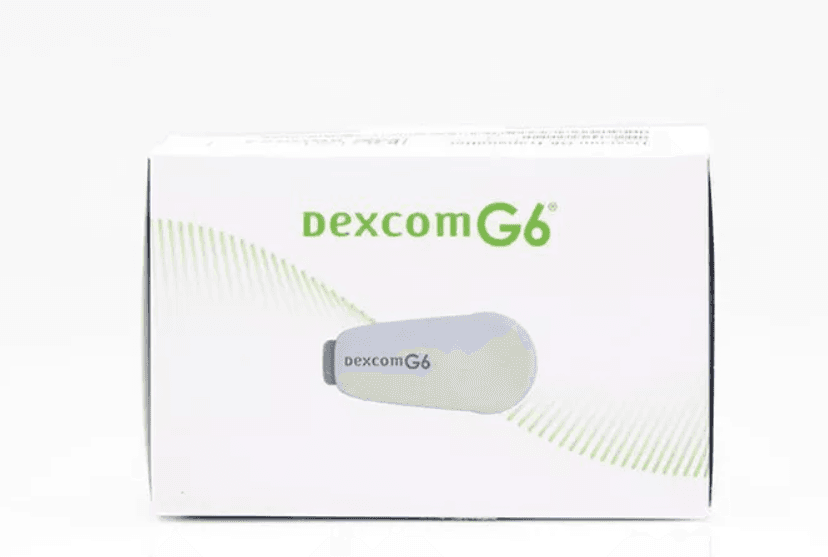
Dexcom G6 Transmitter
Buy Dexcom G6 Transmitter Online


Buy Dexcom G6 Transmitter online with a valid prescription and compare current listed pricing, device details, and safety basics before checkout. This page lets you match the G6 transmitter to your sensor, receiver, or compatible smart device, then review order factors for US delivery from Canada where available.
The transmitter is the reusable electronic part of the Dexcom G6 continuous glucose monitoring system. It snaps into a G6 sensor and sends glucose readings wirelessly, so choosing the correct device matters before you place an order.
Keep your prescriber information handy in case prescription details need to be verified. Then focus on the product match: device name, quantity, item number, replacement timing, display device compatibility, and handling needs.
Dexcom G6 Transmitter Price and Available Options
Start by comparing the current listed price for the selected transmitter and quantity shown on the product page. The Dexcom G6 Transmitter price should be reviewed separately from G6 sensors, receivers, or bundle listings because each component has a different role in the CGM system.
Price can change when a listing includes a single transmitter, a kit, or another presentation. If the page shows more than one option, match the selected item to your prescription and device setup before comparing totals. For customers comparing Dexcom G6 Transmitter price in Canada with U.S. access options, confirm the listing currency, quantity, and any shipping or handling charges before checkout.
The transmitter is not the same as the disposable sensor. A sensor measures glucose in interstitial fluid, which is fluid between cells. The transmitter sends that sensor information to a compatible display device. That difference is important when checking the Dexcom G6 Transmitter cost against replacement sensors or receiver accessories.
| Detail to compare | What to check | Why it matters |
|---|---|---|
| Product type | G6 transmitter device | Confirms you are not selecting sensors or a receiver by mistake. |
| Quantity | One transmitter or listed pack contents | Total cost depends on the selected quantity, not only the product name. |
| Compatibility | Dexcom G6 sensors and display options | G6 parts are not interchangeable with every Dexcom system. |
| Identifier | 08627001601 if shown | Helps match a product listing or prescription reference. |
Quick tip: Compare the transmitter listing with your current sensor supply before ordering.
Customers reviewing broader monitoring supplies can browse the Diabetes Supplies collection, but the transmitter should still match the exact system your clinician prescribed.
How to Buy Dexcom G6 Transmitter Online
To order Dexcom G6 Transmitter online, choose the correct product listing, review the quantity, and make sure the device matches your G6 system. A valid prescription is required. Prescription details may be checked with your prescriber when needed, and supporting documents may be requested for some orders.
Before checkout, compare the selected transmitter with the wording on your prescription. If the prescription mentions a Dexcom receiver and transmitter, confirm whether you need the transmitter only or another component as well. If you use a compatible smartphone, check that your app and operating system are supported by Dexcom before relying on phone display.
Customers exploring US shipping from Canada should review the full order details before submitting payment. Device availability, handling requirements, and access rules may affect how the order is processed, so do not assume that a past order or another CGM item follows the same path.
- Select the device listing that matches the prescription.
- Check quantity, item details, and any available presentation notes.
- Prepare prescriber and patient information for the order.
- Review shipping, handling, and total order charges.
- Keep the transmitter ID and packaging details after arrival.
Do not open or activate a new G6 transmitter until you are ready to pair it according to Dexcom instructions. Activation starts the transmitter life, so timing matters when coordinating a new sensor session.
What the Transmitter Does in the G6 System
The Dexcom transmitter sits inside the G6 sensor housing and communicates glucose information by Bluetooth. It does not measure glucose by itself. The sensor and transmitter work together, then send readings to a Dexcom receiver or compatible smart device.
This device is used as part of continuous glucose monitoring, often shortened to CGM. CGM provides frequent glucose trend information between standard blood glucose checks. It can help users and clinicians see patterns, alerts, and trends, but it still needs correct setup and appropriate clinical interpretation.
The G6 transmitter is a key replacement part because it has a limited battery life. A new G6 transmitter may be needed when the app or receiver warns that the current one is near the end of service. If you are changing G6 transmitter components, follow the app prompts and manufacturer instructions rather than forcing a reset or reuse beyond its intended life.
The Glucose Monitors and Meters resource can help compare CGM terms with traditional fingerstick meters. That comparison is useful when deciding which supplies belong with your prescribed monitoring plan.
Product Details to Check Before Ordering
Several small details can prevent ordering mistakes. Confirm that the listing says Dexcom G6, not G7 or another Dexcom generation. The transmitter G6 component is designed for the G6 system, and system parts should not be mixed unless the manufacturer instructions clearly allow it.
Check whether your prescription or insurance paperwork lists the transmitter by name, component type, or item number. Some records may use plain wording such as Dexcom transmitter, Dexcom sender, or Dexcom G6 transmitter replacement. If the wording is unclear, ask the prescriber or clinic to clarify the exact component.
Also consider what you already have at home. A Dexcom G6 transmitter and receiver may be used together, but many users display readings on a compatible smart device instead. If you already have sensors but no working transmitter, ordering sensors alone will not restore readings.
- System generation: Confirm G6 before ordering.
- Display path: Check receiver or phone compatibility.
- Sensor supply: Make sure sensors are available.
- Transmitter ID: Keep it for pairing.
- Packaging condition: Inspect the box before use.
Why it matters: A CGM order is only useful when all required system components work together.
Replacement Timing and Setup Basics
A Dexcom G6 transmitter replacement is usually planned around transmitter life and sensor sessions. Dexcom G6 transmitters are commonly used for about three months after activation, but you should follow the app, receiver alerts, and official instructions for the exact replacement prompt.
When the system warns that the transmitter is nearing the end of life, prepare the replacement before your next sensor change. This reduces the chance of a gap in readings. Do not depend on a transmitter after the system indicates that it is expired or no longer supported for use.
Some users search for ways to replace Dexcom transmitter without removing sensor hardware. Avoid improvised removal methods unless they are supported by the manufacturer or your diabetes care team. For most routine changes, the transmitter is handled as part of the sensor replacement workflow shown in official setup materials.
Pairing requires the transmitter ID, which appears on the device or packaging. Enter the ID carefully. A wrong ID can delay setup, create failed pairing attempts, or make it harder to identify which component is active.
If readings do not appear after setup, check the simple items first: Bluetooth status, receiver or phone battery, device range, app permissions, and whether the warm-up period has completed. Contact your care team or Dexcom support if alerts, pairing failures, or unexpected gaps continue.
Storage, Handling, and Travel
The G6 transmitter is an electronic medical device, so protect it from avoidable damage. Store it in the original packaging until use, keep it away from moisture extremes, and avoid leaving it in vehicles or luggage exposed to excessive heat or freezing temperatures.
During travel, keep CGM supplies accessible and protected. Carry the transmitter, sensors, receiver, charger, and backup glucose meter supplies in a way that prevents crushing or loss. If crossing borders, keep prescription details and packaging information available in case officials or carriers ask about medical supplies.
Unlike refrigerated insulin, this transmitter does not usually require cold-chain handling. Still, shipping and storage conditions matter because extreme temperatures or physical damage can affect electronics. Review the packaging after arrival and do not use a damaged device without professional guidance.
Security screening may require extra planning. Follow Dexcom travel guidance for scanners, imaging equipment, and situations where the transmitter or receiver could be exposed to procedures that the manufacturer warns against. Keep backup monitoring supplies available when travel disrupts charging, signal range, or sensor changes.
Safety and Monitoring Before Use
The transmitter supports glucose monitoring, but it does not replace clinical judgment. If symptoms do not match the CGM reading, confirm with a blood glucose meter and follow your clinician’s instructions. This is especially important with symptoms of hypoglycemia, meaning low blood sugar, or hyperglycemia, meaning high blood sugar.
Serious safety issues can occur if CGM readings are wrong, delayed, or unavailable. Device errors, sensor placement problems, signal loss, interfering medicines, or missed alerts can affect decision-making. Do not ignore symptoms just because a display shows a number that seems reassuring.
Some medicines and procedures can interfere with CGM use. Dexcom has warned that hydroxyurea can falsely raise readings with some Dexcom systems. High doses of acetaminophen may also affect readings, depending on system instructions and dose. Review the user guide and ask your clinician how to handle readings if you use these medicines.
Remove or manage the device according to manufacturer instructions before MRI, CT scan, or diathermy procedures. These procedures can damage components or create unsafe readings. Tell the imaging team that you use a CGM system before the appointment begins.
- Skin irritation: Watch for redness or rash near adhesive.
- Signal loss: Keep display devices within range.
- Alert limits: Confirm alarms are turned on.
- Symptom mismatch: Check with a meter.
- Procedure warnings: Review imaging restrictions before scans.
The High Blood Sugar Symptoms resource can help identify urgent warning signs that should not be managed by device readings alone.
Coverage, Cash Pay, and Related Supplies
Dexcom G6 Transmitter cost may be reviewed through insurance, cash-pay, or other access pathways. If paying without insurance, compare the current listed price, quantity, and any required supplies together. A transmitter alone is not a complete CGM system.
Coverage rules may separate transmitters, sensors, receivers, and accessories. Some plans treat CGM supplies as durable medical equipment, while others use pharmacy benefit rules. The Diabetic Supplies Covered By Medicare resource can help frame the questions to ask a plan administrator.
If your clinician recently changed your monitoring plan, do not assume older supplies remain compatible. G6 sensors, G6 transmitters, and a compatible display device are used together. A Dexcom receiver and transmitter from one generation may not work with another generation of sensors.
Customers comparing broader diabetes products can browse Diabetes Products, but component-level matching is still essential. For wearable device terminology, the Diabetes Patch resource may help distinguish adhesive patches, sensors, and electronic transmitters.
When to Contact Your Clinician
Contact your diabetes care team if readings are repeatedly inconsistent with symptoms, alerts are difficult to interpret, or you are unsure how to use CGM data with your treatment plan. Your clinician can help set alert thresholds, review backup testing instructions, and decide whether CGM reports should be shared between visits.
Ask before changing how you respond to readings. The transmitter sends data, but medication dosing, food choices, and urgent care decisions should follow the plan created with your healthcare professional. This is especially important for children, pregnancy, severe hypoglycemia history, impaired awareness of lows, or frequent unexplained highs.
Also contact the clinic or manufacturer support if a new transmitter fails to pair, loses signal repeatedly, or appears damaged. Keep the packaging, transmitter ID, order information, and receiver or phone details available so the issue can be assessed efficiently.
Authoritative Sources
Product instructions and official system materials should guide setup, compatibility, and safety decisions. Use these sources alongside your clinician’s instructions when reviewing the G6 transmitter.
- Official Dexcom G6 system information describes the CGM system and display options.
- Official Dexcom component requirements FAQ outlines the sensors, transmitter, and compatible display devices.
- Official sensor and transmitter training video shows manufacturer setup steps for the G6 system.
This content is for informational purposes only and is not a substitute for professional medical advice.
{acf_product_technical_information}
Express Shipping - from $25.00
Prices:
- Dry-Packed Products $25.00
- Cold-Packed Products $35.00
Standard Shipping - $15.00
Shipping with this method takes 5-10 days
Prices:
- Dry-Packed Products $15.00
- Not available for Cold-Packed products
How long does a Dexcom G6 transmitter last?
A Dexcom G6 transmitter is commonly used for about three months after activation, but the app or receiver should be treated as the main source for replacement prompts. The system may warn when the transmitter is nearing the end of service. Do not rely on an expired transmitter or try to extend use beyond manufacturer instructions. Keep a replacement available if your care plan depends on continuous glucose readings.
What is the difference between a Dexcom G6 sensor and transmitter?
The sensor is the disposable part placed under the skin to measure glucose in interstitial fluid. The transmitter is the reusable electronic component that snaps into the sensor housing and sends readings wirelessly to a compatible receiver or smart device. Both parts are needed for the Dexcom G6 system to work. A receiver or compatible phone then displays readings, trends, and alerts.
Can you replace a G6 transmitter without removing the sensor?
Routine transmitter changes are usually handled according to Dexcom instructions and app prompts, often around a sensor change. Some users search for ways to remove a transmitter during an active sensor session, but improvised methods can damage components or disrupt readings. Follow the official user guide or contact Dexcom support or your diabetes care team if a transmitter fails before the sensor session ends.
What safety checks matter when using a CGM transmitter?
Check that alerts are turned on, Bluetooth is working, and the receiver or smart device stays within range. Confirm readings with a blood glucose meter when symptoms do not match the CGM display, readings are missing, or your clinician has told you to use backup testing. Review manufacturer warnings for medications or procedures that can interfere with readings, including certain imaging procedures and possible medication-related inaccuracies.
What should I ask my clinician before using a G6 transmitter?
Ask how CGM readings should fit into your diabetes plan, when to confirm with a fingerstick meter, and what alert settings are appropriate for you. It can also help to ask how to handle sensor failures, travel, exercise, illness, and repeated high or low readings. If you use medications that may interfere with CGM accuracy, ask whether extra monitoring steps are needed.
Rewards Program
Earn points on birthdays, product orders, reviews, friend referrals, and more! Enjoy your medication at unparalleled discounts while reaping rewards for every step you take with us.
You can read more about rewards here.
POINT VALUE
How to earn points
- 1Create an account and start earning.
- 2Earn points every time you shop or perform certain actions.
- 3Redeem points for exclusive discounts.
You Might Also Like
Select options
This product has multiple variants. The options may be chosen on the product page
Select options
This product has multiple variants. The options may be chosen on the product page
Select options
This product has multiple variants. The options may be chosen on the product page
Select options
This product has multiple variants. The options may be chosen on the product page
Related Articles
Diabetes, Type 1
Continuous Glucose Monitoring: How CGMs Fit Diabetes Care
Continuous glucose monitoring is a way to track glucose throughout the day and night with a small wearable sensor. It matters because it shows patterns, direction, and alerts that a…
Dermatology, Infectious Disease,
How to Get Rid of a Cold Sore and Ease Symptoms Safely
A cold sore usually cannot be erased overnight. If you want to know how to get rid of a cold sore, the fastest practical step is to treat it early,…
Diabetes, Endocrine &
What Is Glucagon Like Peptide 1 and What Does It Do?
What is glucagon like peptide 1? In simple terms, it is a hormone your gut releases after you eat. Clinically, it is called glucagon-like peptide-1, or GLP-1, an incretin (a…
Type 2 Diabetes,
Does Metformin Cause Weight Loss? Expectations and Limits
Yes, metformin can cause modest weight loss in some people, but it is not primarily a weight-loss drug. If you are asking does metformin cause weight loss, the practical answer…