
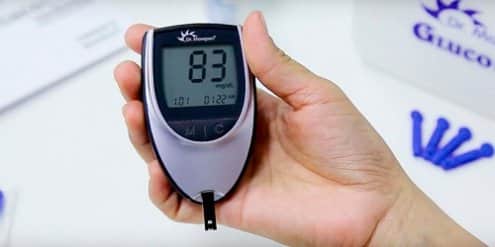
A glucometer is used to check your blood glucose from a small blood drop, usually from a fingertip. The main glucometer uses include confirming symptoms, tracking fasting and meal-related patterns, supporting insulin discussions, and helping you know when a reading needs follow-up. Accurate technique matters because small testing errors can change the number you see.
This article explains how meters work, how to test step by step, how to handle strips, and when a continuous glucose monitor may be a better fit. It is written for people managing diabetes at home and for caregivers learning the routine.
Key Takeaways
- Core purpose: meters estimate current blood glucose.
- Technique matters: clean, dry hands improve reliability.
- Strip care matters: heat, moisture, and age can cause errors.
- Device fit matters: choose features that match vision, dexterity, and logging needs.
- Limits matter: meters show one moment, while CGMs show trends.
What a Glucometer Does and Why It Matters
A glucometer, also called a blood glucose meter, is a handheld device that estimates the glucose level in a small blood sample. Most home meters use disposable test strips with enzyme chemistry. When blood touches the strip, the meter reads an electrical signal and converts it into a glucose result.
The glucometer definition and function are simple in practice but technical inside the device. A typical glucose meter kit includes the meter, test strips, a lancing device, lancets, and sometimes control solution. The meter displays the result in mg/dL or mmol/L, depending on the setting and country.
Why this matters: a single reading can help you connect symptoms, meals, exercise, and medication timing. A pattern of readings can help your care team review your plan. The result should not be treated as a diagnosis by itself, and medication changes should be discussed with a clinician.
People use meters differently. Someone taking insulin may check at specific times advised by their care team. Someone using lifestyle changes or non-insulin medicines may test less often, but may still use readings to understand patterns. During illness, pregnancy, medication changes, or repeated symptoms, your clinician may recommend a different schedule.
Common Glucometer Uses in Daily Diabetes Care
The most common glucometer uses are checking fasting glucose, pre-meal glucose, post-meal response, symptoms of low or high blood sugar, and overnight or exercise-related changes. Each use answers a different question.
- Fasting checks: show glucose after sleep or a longer food gap.
- Pre-meal checks: give context before eating or using mealtime insulin.
- Post-meal checks: show how a meal affected glucose.
- Symptom checks: help confirm shakiness, sweating, thirst, or blurred vision.
- Illness checks: may show rising glucose during infection or stress.
Testing can also help you prepare useful notes for appointments. A number alone is less helpful than a number with context. Record the time, meal timing, carbohydrate estimate if used, activity, medication timing, and any symptoms. Many meters store results, while app-connected devices may help organize them.
For work, travel, and shift schedules, testing routines can be harder to maintain. Practical planning can help. For more daily-life context, see Diabetes Management at Work.
Normal or target ranges vary by age, pregnancy status, diabetes type, medications, and individual risk. Older adults may have different targets, especially when low blood sugar risk is high. Ask your clinician what range applies to you rather than relying on a general chart.
How to Use a Glucometer Step by Step
How to use a glucometer step-by-step starts with clean hands and the correct strip for your meter. Most errors happen before the meter even counts down, so preparation is part of the test.
- Gather supplies: meter, matching strip, lancing device, lancet, tissue, and sharps container.
- Wash hands: use soap and warm water, then dry completely.
- Insert strip: place a new strip into the meter as directed.
- Prepare lancet: load a fresh lancet and set the depth if adjustable.
- Lance finger: use the side of the fingertip, not the pad.
- Form drop: gently massage from hand toward fingertip if needed.
- Apply sample: touch the blood drop to the strip edge and let it wick.
- Wait for result: keep the meter still until it finishes.
- Record context: note meals, activity, medication timing, and symptoms.
- Dispose safely: place lancets in a sharps or puncture-resistant container.
A lancing device is sometimes called a glucometer pen. It does not measure glucose. It holds the lancet and helps make a controlled skin puncture. Use a new lancet when possible, because dull lancets can hurt more and may increase irritation.
If the result does not match how you feel, retest with clean, dry hands and a new strip. Food residue, lotion, or wet fingers can alter the sample. Cold fingers can also make it harder to get enough blood.
Quick tip: Keep a small testing kit in one place so missing supplies do not interrupt the routine.
How Test Strips and Meter Parts Work Together
A glucose meter needs the right strip to work correctly. Test strips are not interchangeable across most meter brands. The strip design, chemistry, sample channel, and meter algorithm are built to work as a matched system.
How to use glucose meter and test strips correctly means protecting the strip before blood touches it. Keep strips in their original vial or package. Close the cap quickly. Avoid bathrooms, car glove boxes, windowsills, and other humid or hot places. Do not use damaged or expired strips.
How do glucose test strips work? In simple terms, the strip contains chemicals that react with glucose in the blood. The meter measures the reaction and displays an estimated glucose value. Too little blood, a contaminated strip, or poor storage can interfere with that process.
Some older meters require coding when a new strip lot is opened. Many newer meters do not, but you should still follow the manual. If your meter supports control solution testing, use it when opening a new strip container, after dropping the meter, or when readings seem unusual.
For a browseable list of diabetes-related supplies and device categories, you can review the Diabetes Products collection. Product pages can help compare broad device categories, but your clinician or diabetes educator can help decide what fits your care plan.
Common Testing Mistakes
- Wet hands: water can dilute the blood drop.
- Food residue: fruit or sugar on fingers can raise readings.
- Expired strips: old chemistry may be less reliable.
- Wrong strips: mismatched strips may not work correctly.
- Heavy squeezing: tissue fluid can affect the sample.
- Poor storage: heat and humidity can damage strips.
Choosing a Meter That Fits Your Routine
The best glucometer is the one you can use correctly and consistently. Accuracy standards matter, but usability also matters. A meter that is hard to read, hard to hold, or hard to sync may lead to skipped checks.
Consider screen size, backlighting, audio prompts, button feel, memory capacity, and the size of the blood sample needed. People with limited hand strength may prefer larger strips or a simpler lancing device. People who track patterns may prefer Bluetooth syncing and meal tags.
A glucose monitor kit with strips can be convenient for setup, but check that replacement strips are accessible and compatible. If a model is used for insulin decisions, ask your care team whether it fits your treatment workflow. If you are comparing common meters, examples include the Contour Next EZ Meter, OneTouch Verio Flex Meter, and Freestyle Freedom Lite Meter.
Some people explore cash-pay options for supplies when coverage is limited. CanadianInsulin.com is a prescription referral platform, and where prescriptions are required, prescription details may be confirmed with the prescriber. Device and supply access can depend on eligibility, jurisdiction, and the dispensing pharmacy.
For broader device context, including pens, pumps, and sensors, see Diabetes Tech. The Diabetes Condition page also provides a browseable condition-based product list.
When a Continuous Glucose Monitor May Fit Better
A continuous glucose monitor, or CGM, tracks glucose trends through a wearable sensor. It can show whether glucose is rising, falling, or staying steady. This trend information is the main difference from fingerstick testing.
A blood sugar monitor without finger pricks may sound like a complete replacement, but that depends on the device and situation. Some CGM users still need fingerstick checks when symptoms do not match sensor readings, during sensor warm-up, or when the device asks for confirmation. Follow the device instructions and your clinician’s guidance.
CGMs may be useful for people with frequent lows, hypoglycemia unawareness, overnight concerns, or changing medication plans. They may also help identify post-meal patterns. Meters remain useful because they are portable, familiar, and often needed for confirmation.
There are also disadvantages of glucometer testing. Fingersticks can be uncomfortable. Supplies must be carried and stored correctly. A single result does not show direction or speed of change. CGMs have their own tradeoffs, including sensor wear, alarms, learning curves, and occasional mismatch with fingerstick readings.
If you use CGM reports, time-in-range can help summarize how often readings stay within a target range set by your care team. This calculator can help organize general time-in-range math from readings or time blocks, but it does not replace clinical interpretation.
CGM Time-in-Range Summary
Summarise CGM percentages across very low, low, in-range, high, and very high glucose bands.
These calculations are for education only and do not replace clinical advice, diagnosis, or treatment. Always confirm medical decisions with a qualified healthcare professional.
Understanding Readings, Units, and Unexpected Results
Glucometer results are estimates, not laboratory plasma glucose values. Home meters are designed for practical self-monitoring, but several factors can affect readings. Dehydration, anemia or high hematocrit, altitude, interfering substances, and poor sampling technique can all contribute to differences.
Units can also cause confusion. Many readers see mg/dL, while others use mmol/L. A glucose converter can help with unit conversion when reviewing results from different sources, but target ranges should still come from your clinician.
If a reading is unexpectedly low, confirm it when safe to do so and follow the low blood sugar plan your clinician gave you. If you have confusion, fainting, seizure, chest pain, persistent vomiting, or severe weakness, seek urgent medical care. For practical low-glucose planning, see What to Do When Blood Sugar Is Low.
Food questions often come up after a low reading. A peanut butter sandwich contains carbohydrate, fat, and protein, but it may not act as quickly as a fast-acting carbohydrate source. Your care team can tell you what to use for lows and how to recheck. Nuts can fit some meal plans, but portions, added sugar, sodium, and personal glucose response matter.
Repeated high or low readings deserve review. Bring your meter, log, and strip container to appointments. The date, time, and meal context often explain more than a single isolated number.
Authoritative Sources
For regulatory context on blood glucose monitoring systems, review the FDA overview of blood glucose monitoring devices.
For patient-focused guidance on checking and using results, see the CDC guidance on monitoring blood sugar.
For detailed clinical standards on diabetes monitoring and technology, consult the American Diabetes Association Standards of Care.
Recap
Glucometer uses center on checking current glucose, confirming symptoms, and building patterns that can support safer diabetes discussions. A reliable reading depends on clean hands, good strip storage, the right supplies, and careful technique.
Choose a meter that fits your hands, vision, logging habits, and care plan. If fingersticks feel burdensome or trend alerts would help, ask your clinician whether CGM is appropriate. Keep notes, review patterns, and seek care promptly for severe symptoms or repeated unexpected readings.
This content is for informational purposes only and is not a substitute for professional medical advice.