
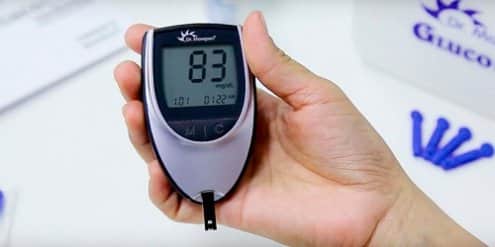
Knowing core glucometer uses helps you check blood glucose safely, interpret results, and act with confidence. This guide explains device basics, step-by-step testing, strip handling, choosing a meter, and when continuous monitoring may fit better. It blends clinical detail with plain-language tips you can apply today.
Key Takeaways
- Purpose and basics: what meters do and how they work.
- Clean, consistent technique improves accuracy and reliability.
- Right strips, storage, and control tests reduce errors.
- Pick features that match vision, dexterity, and data needs.
- Know limits; consider CGM for frequent trends or alerts.
What Is a Glucometer and How It Works
A glucometer is a small handheld analyzer that estimates capillary blood glucose using an electrochemical reaction. Clinically, it is a portable biosensor that measures glucose via enzyme-coated test strips and reports results in mg/dL or mmol/L. In plain terms, it reads a tiny drop of blood and converts that signal into a number you can track.
The glucometer definition and function cover sensor chemistry, sample timing, and algorithmic conversion. Most meters require fresh, fingertip capillary blood and a matched strip lot. For an overview of designs and user features, see Types of Glucometers for key features and form factors. For context on where meters fit alongside pumps and sensors, see Diabetes Devices for an overview of SMBG and CGMs.
Authoritative guidelines outline when and how often to check, as well as targets by clinical context. The American Diabetes Association publishes annual standards that discuss self-monitoring and sensor-based care; review the ADA Standards of Care for current monitoring recommendations.
Glucometer Uses in Daily Diabetes Self‑Care
People use meters to assess fasting levels, pre‑meal readings, and post‑meal responses. Results inform insulin dosing decisions made with a clinician, guide carbohydrate adjustments, and help evaluate exercise effects. During illness, more frequent checks can catch rising trends earlier. Pregnant patients with diabetes or gestational diabetes may also test on tighter schedules.
Testing can confirm symptoms such as shakiness or blurred vision and help prevent severe lows or highs. Trend notes around meals, activity, and medications provide clinical context. When paired with a logbook or an app, patterns emerge. If you use a pump or take mealtime insulin, structured testing around adjustments may help you and your care team refine therapy safely.
How to Use a Glucometer Step‑By‑Step
Below is a practical routine you can adapt. It reflects common meter workflows, including Accu‑Chek, OneTouch, and similar devices. The phrase how to use a glucometer step-by-step reflects this standard approach.
- Prepare: Wash hands with warm water and soap; dry fully.
- Load: Insert a new strip; confirm meter is ready.
- Lance: Use a fresh lancet; choose a side of the fingertip.
- Sample: Gently milk from base to tip; avoid squeezing the puncture.
- Apply: Touch the blood drop to the strip edge; let it wick.
- Wait: Hold steady until the meter beeps or counts down.
- Record: Note time, meal status, insulin dose, or exercise.
- Dispose: Place strip and lancet in a sharps or puncture‑resistant container.
For strip handling specifics and contamination pitfalls, see Diabetic Test Strips Use for storage and handling rules. Users of Accu‑Chek can follow brand instructions for lancing devices; those exploring a pen‑like sampler can review manufacturer guides on depth and lancet size. Printing a one‑page checklist or a how to use a glucometer pdf can reinforce routine. If you prefer demos, a how to use a glucometer video from your meter’s manufacturer may help.
Common Technique Mistakes to Avoid
Residual food or lotions can skew results; always wash and dry hands. Squeezing the puncture site dilutes blood with tissue fluid, lowering readings. Cold fingers reduce blood flow; warm your hands first. Using expired strips, mismatched strip lots, or damaged vials increases error risk. If results do not match how you feel, repeat with a new strip and clean hands before making decisions.
Test Strips, Lancets, and Meter Care
Strips are sensitive to moisture, heat, and air. Keep vials closed, store within the label’s temperature range, and use before expiration. The phrase how to use glucometer strips also includes avoiding decanting strips into pillboxes, which exposes them to humidity. Some meters still require coding or calibration with each new lot; follow your manual closely.
Use a fresh lancet each time to minimize pain and infection risk. Rotate fingers or consider alternate sites if your device supports them. For more strip specifics, including enzymes and sample volumes, your manufacturer’s insert is the best source. If you want a concise comparison of options, browse Diabetes Articles for storage thresholds and technique refreshers. For general shopping context, see Diabetes Products for meter and accessory categories on one page.
Choosing a Meter and Alternatives
Pick features that fit your vision, dexterity, and data needs. Consider backlit screens, large numbers, simple menus, and audio prompts if needed. Memory size, tagging (pre/post‑meal), and Bluetooth syncing can streamline logging. People who travel may value long battery life and a hard case. Those who prefer app integration can explore devices that sync readings automatically.
Before buying, ask your care team which models work with your strips and insurance. Although shoppers sometimes compare a walmart glucose meter with a walgreens glucose meter, the core choice should focus on accuracy, usability, and support. For a concise comparison of capabilities, see Best Blood Sugar Monitor for a feature comparison across common models. If you want a straightforward meter with a clear display, the Freestyle Freedom Lite Meter may suit users who prefer fewer steps.
People often ask which glucometer is best and give accurate result, but the best pick depends on your hands, vision, routines, and support network. Discuss any change with your clinician, especially if insulin dosing decisions rely on readings. For app‑connected tracking and reminders, select models that share data to caregivers or apps. Those who need structured trend insight may consider sensor‑based options as an alternative.
When CGM May Be Better
Continuous glucose monitors provide near‑real‑time trend data and alerts for rising or falling glucose. A continuous glucose monitor can reduce fingersticks in many situations, though occasional confirmation tests are still advised. These systems help analyze overnight patterns, exercise responses, and post‑meal curves. They can be useful type 2 diabetes devices when medication changes are frequent, or for people with hypoglycemia unawareness. For broader technology context and hygiene differences, see Pens, Pumps, and CGMs to understand device hygiene and handling differences. The FDA provides an overview of home glucose meters and their role; review the FDA information on home glucose meters for regulatory context.
Understanding Readings, Errors, and Limitations
Meter results are estimates, not lab values. Physiologic and technical factors introduce variance between fingerstick and plasma measurements. Hematocrit extremes, dehydration, altitude, and interfering substances can bias results. If a number conflicts with how you feel, retest with clean hands and a new strip. When needed, a laboratory plasma glucose can clarify discordant readings.
Users should understand disadvantages of glucometer devices. Capillary testing samples a moment in time and may miss trends between checks. It requires a fingerstick and supplies, which can deter frequent use. Sensor‑based systems can complement meters by offering alerts and trend arrows, though they have their own limitations. For an ease‑of‑use perspective, see Contour Next EZ Meter for ease‑of‑use tips and step simplification. For practical SMBG guidance, the NIDDK overview on monitoring explains targets, logs, and error reduction.
Safety, Calibration, and When to Seek Care
Run control solution tests when you open a new strip vial, after a drop, or when readings seem off. Clean your meter per the manual; avoid alcohol on optical sensors unless specified. Keep supplies in a moderate environment and carry them in an insulated pouch on hot or cold days. Follow disposal rules for sharps and used strips in your area.
People learning how to check blood sugar at home with finger should confirm unexpected lows or highs with a second test. Seek urgent care for severe symptoms such as confusion, chest pain, or persistent vomiting. For mild symptoms, recheck after treating a low or hydrating for a high. The CDC summarizes warning signs and self‑care steps; see this CDC hypoglycemia resource for symptom recognition and safety tips.
Recap
Meters help you track glucose, spot trends, and discuss real‑world results with your care team. Accurate technique, proper strip handling, and the right feature set improve reliability and ease. If fingersticks feel burdensome or you need trend alerts, discuss sensor‑based options with your clinician. Use consistent routines and keep notes so decisions can be data‑informed and safer.
Tip: Build a brief checklist you can follow anywhere, and review it monthly to refresh technique.
This content is for informational purposes only and is not a substitute for professional medical advice.