
Shipping with this method takes 3-5 days
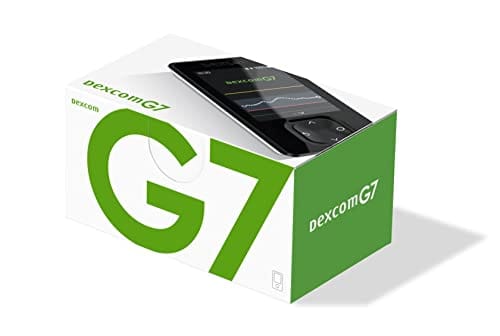
Dexcom G7 Receiver
Buy Dexcom G7 Receiver Online


Dexcom G7 Receiver is a dedicated display device for the Dexcom G7 continuous glucose monitoring system. You can buy Dexcom G7 Receiver online, view the current price, and match the receiver device to the Dexcom G7 supplies used in your diabetes management plan. The receiver displays glucose readings, trend information, and alerts when it is correctly paired with an active Dexcom G7 sensor.
The receiver does not measure glucose by itself. A Dexcom G7 sensor is still needed to collect glucose data and send it to a compatible display device. Choose the receiver quantity shown during ordering, then make sure any sensor needs, app use, and replacement plans match the instructions you received from your diabetes care team.
Dexcom G7 Receiver Price and Device Selection
The Dexcom G7 Receiver price should be read together with the exact device name and quantity shown during ordering. A receiver-only purchase is different from a sensor box, a starter kit, or another CGM supply. For out-of-pocket planning, compare the receiver cost with the total supplies needed for your current Dexcom G7 setup rather than treating the receiver as a complete CGM system.
Cash-pay cost may depend on the receiver device, the number of units ordered, and whether separate sensor supplies are purchased at the same time. If you are comparing Dexcom G7 Receiver without insurance, focus on the full system requirement: the receiver displays data, but sensors generate the readings. The Diabetes Supplies category can help separate CGM displays from sensors, meters, pen needles, and other diabetes products.
| Selection point | What to verify | Why it matters |
|---|---|---|
| Device type | Confirm it is the Dexcom G7 Receiver display. | The receiver and sensor are separate parts. |
| Quantity | Review the number of receiver units. | A receiver is reusable and is not replaced with every sensor. |
| Compatibility | Use Dexcom G7 supplies with the Dexcom G7 system. | Dexcom G6 and G7 components are not interchangeable. |
| Included contents | Read the device and accessory wording during checkout. | Do not assume sensors or kit contents are included. |
Quick tip: Confirm whether your order is for a receiver only or for additional CGM supplies before checkout.
How to Order the Receiver Online
Order the Dexcom G7 Receiver by choosing the receiver device and quantity that fit your current CGM system. Keep the product family consistent with your diabetes technology plan, especially if you have recently switched from Dexcom G6 to Dexcom G7. If order details need confirmation, we may review the information provided to help the device match the requested CGM supply.
US delivery from Canada may be available for this product through the store’s order process. Shipping needs for the receiver differ from temperature-sensitive medicines because the receiver is an electronic display device, not insulin or an injectable medicine. If your cart includes insulin or other diabetes medications, follow the handling directions for each item separately.
- Device match: Select the receiver for Dexcom G7, not a G6 component.
- System need: Make sure sensors are available if you plan to use the receiver for readings.
- Quantity: Choose the receiver quantity intended for the person using the system.
- Instructions: Follow the manufacturer user guide and your clinician’s diabetes plan.
Do not change insulin doses, glucose targets, or treatment decisions because of an online order. The receiver is a monitoring display, and treatment choices should follow the plan set with your healthcare professional.
Receiver Only, Sensor, and Kit Differences
A Dexcom G7 receiver only order is for the handheld display device. It should not be treated as a receiver and sensor kit unless sensors are clearly included in the item being purchased. This distinction matters because the receiver can show readings only after it is paired with a working Dexcom G7 sensor.
The Dexcom G7 receiver and sensor work together as parts of a continuous glucose monitoring system. The sensor is worn on the body for its sensor session and estimates glucose levels in interstitial fluid, which is fluid between cells. The receiver displays those readings, trends, and alerts when the system is set up correctly.
Some people use a compatible smartphone app as their primary display. Others prefer the Dexcom G7 display device because it is separate from a phone, easier to reserve for glucose monitoring, or useful when phone compatibility or battery life is a concern. The best display choice depends on the user’s device access, alert needs, and clinician guidance.
- Receiver: Displays glucose readings, trend arrows, and alerts.
- Sensor: Measures and sends glucose data during each sensor session.
- App: May show readings on a compatible smart device.
- Kit: May include more than one component only when clearly stated.
Why it matters: A receiver without an active compatible sensor cannot provide glucose readings.
How the Display Device Supports Diabetes Monitoring
The Dexcom G7 CGM receiver is used for continuous glucose monitoring in people who use the Dexcom G7 system for diabetes management. CGM readings can help show current glucose levels, direction of change, and alert patterns throughout the day. The receiver is not a cure, treatment, or replacement for professional diabetes care.
A dedicated receiver may be helpful for people who want a separate glucose display instead of relying only on a smartphone. It can also be useful when caregivers need a simple device to view readings and alerts. The receiver must remain close enough to the active sensor to receive data, and alert settings should be checked after setup.
For broader diabetes product browsing, the Diabetes Products category groups medicines and supplies in one area. The Diabetes collection can also help you understand how glucose monitoring, insulin therapy, and related supplies fit into diabetes care.
Setup, Pairing, and Compatibility Checks
Dexcom G7 receiver setup should follow the official Dexcom instructions included with the device and sensor. In general, the receiver needs to be charged, powered on, and paired with the active Dexcom G7 sensor before readings can appear. Do not use setup steps from another CGM system unless the manufacturer says they apply to G7.
Compatibility is a common ordering issue. Dexcom G6 sensors, transmitters, and receivers belong to a different system and should not be assumed to work with Dexcom G7. If you recently changed systems, confirm the device family on every supply before relying on it for alerts or glucose data.
Receiver replacement is different from sensor replacement. The receiver is reusable and is not normally replaced with every sensor session. Replacement may be considered if the screen, buttons, charging port, battery performance, or data display no longer works as expected, or if manufacturer support guidance recommends a replacement.
| Before use | Practical check |
|---|---|
| Charge level | Charge the receiver before relying on alerts. |
| Sensor pairing | Pair the receiver with the active Dexcom G7 sensor. |
| Alert settings | Review volume, vibration, and glucose alert thresholds. |
| Device condition | Inspect the screen, buttons, cable, and charging port. |
The Diabetes articles section can help with general education about glucose monitoring and daily diabetes care. Use manufacturer instructions for device-specific setup steps.
Storage, Handling, and Travel Basics
The receiver is an electronic medical device, so everyday handling matters. Keep it clean, charged, and protected from moisture, direct heat, impact, and rough storage. Store the charging cable in a consistent place so the receiver is ready when alerts are part of daily monitoring.
Before travel, pack the receiver, charging cable, backup glucose monitoring supplies, and enough Dexcom G7 sensors for the trip. Keep device instructions available in case pairing, signal range, or battery status needs attention away from home. Air travel with diabetes devices may require additional planning, so check current manufacturer and travel guidance before departure.
Mixed diabetes orders may have different handling needs. Insulin and some injectable medicines can require temperature control, while the receiver itself is managed as an electronic device. Review storage and handling directions by item instead of applying one rule to the entire order.
- Daily care: Keep the receiver charged and accessible.
- Screen protection: Avoid pressure, drops, and moisture exposure.
- Travel prep: Bring charging supplies and backup monitoring tools.
- Mixed products: Follow the storage directions for every medicine or device.
Safety Checks Before Use
CGM readings can support diabetes decisions when the system is functioning correctly, but symptoms still matter. If how you feel does not match the receiver reading, follow your care plan and confirm glucose with a blood glucose meter when appropriate. Do not ignore symptoms of hypoglycemia, meaning low blood glucose, or hyperglycemia, meaning high blood glucose.
Alerts may be missed if the receiver is turned off, out of range, muted, not charged, damaged, or not paired to the active sensor. Check alert volume, vibration, thresholds, and signal range after setup and after any device change. A receiver is most useful when it is close enough to the sensor and noticeable enough for the person using it.
Some medications and medical situations can affect CGM accuracy. Dexcom materials have identified hydroxyurea and higher-than-recommended acetaminophen exposure as possible interference concerns for some Dexcom systems. If you take medicines that may affect readings, ask your clinician when to rely on CGM data and when to use a fingerstick check.
Seek urgent medical help for severe low glucose, confusion, loss of consciousness, persistent vomiting, symptoms of diabetic ketoacidosis, or other emergency symptoms. The receiver displays glucose information, but it cannot treat glucose changes. Keep treatment supplies and an emergency plan available when recommended by your care team.
- Reading mismatch: Use backup testing when symptoms do not fit the display.
- Missed alerts: Check charge, sound, vibration, pairing, and range.
- Medicine concerns: Ask about possible CGM interference.
- Emergency signs: Follow urgent care instructions immediately.
Compare Related Supplies and Product Categories
If the needed item is a sensor rather than a receiver, choose a Dexcom G7 sensor product instead of the display device. The receiver and sensor serve different functions, and both may be needed depending on the person’s CGM setup. A receiver-only purchase will not start a sensor session by itself.
People moving from Dexcom G6 should avoid mixing older components with the G7 system. Dexcom G6 transmitters and receivers are not interchangeable with Dexcom G7 supplies. Checking the product family before purchase helps prevent setup problems and gaps in glucose alerts.
Traditional blood glucose meters and test strips may still be part of a backup plan for many CGM users. Your care team can explain when fingerstick testing is appropriate, especially during symptoms, device problems, or readings that do not match how you feel. CGM and fingerstick tools may support different parts of safe diabetes monitoring.
Authoritative Sources
Manufacturer materials should guide receiver setup, pairing, compatibility, alerts, and sensor use. Store information can help with product selection and ordering, but official device instructions should be used for daily operation.
- Official Dexcom G7 system information describes Dexcom G7 CGM features and display choices.
- Dexcom G7 receiver setup instructions explain manufacturer-supported receiver setup steps.
- Dexcom CGM user guides provide device instructions for Dexcom G7 and related CGM systems.
This content is for informational purposes only and is not a substitute for professional medical advice.
CGM Time-in-Range Summary
Summarise CGM percentages across very low, low, in-range, high, and very high glucose bands.
Entered total
-
should equal 100%
Below range
-
very low plus low
Above range
-
high plus very high
Summary
-
common adult CGM targets vary by patient
These calculations are for education only and do not replace clinical advice, diagnosis, or treatment. Always confirm medical decisions with a qualified healthcare professional.
Blood Glucose Unit Converter
Convert glucose readings between mg/dL and mmol/L without changing the clinical value.
mg/dL
-
US reporting unit
mmol/L
-
International reporting unit
These calculations are for education only and do not replace clinical advice, diagnosis, or treatment. Always confirm medical decisions with a qualified healthcare professional.
HbA1c & eAG Calculator
Convert between HbA1c percentage and estimated average glucose using the ADAG relationship.
HbA1c
-
percentage
eAG mg/dL
-
estimated average glucose
eAG mmol/L
-
estimated average glucose
These calculations are for education only and do not replace clinical advice, diagnosis, or treatment. Always confirm medical decisions with a qualified healthcare professional.
Carb Serving Calculator
Convert total carbohydrate grams into carb choices for meal planning and diabetes education.
Carb choices
-
total carbs divided by choice size
Rounded choices
-
nearest half choice
Carb calories
-
4 kcal per gram
These calculations are for education only and do not replace clinical advice, diagnosis, or treatment. Always confirm medical decisions with a qualified healthcare professional.
Express Shipping - from $29.99
Prices:
- Dry-Packed Products $29.99
- Cold-Packed Products $39.99
Standard Shipping - $19.99
Shipping with this method takes 5-10 days
Prices:
- Dry-Packed Products $19.99
- Not available for Cold-Packed products
Does the Dexcom G7 have a receiver?
Yes. Dexcom G7 can use a dedicated receiver display device. The receiver shows glucose readings, trend arrows, and alerts when it is correctly paired with an active Dexcom G7 sensor.
Is the Dexcom G7 Receiver the same as a sensor?
No. The receiver is the display device, while the sensor is worn on the body and collects glucose data. A receiver-only order does not include a working sensor unless the item specifically includes sensors.
How much does the Dexcom G7 Receiver cost?
The Dexcom G7 Receiver cost is shown during ordering and can vary by device quantity and any additional supplies purchased. For total out-of-pocket planning, include the sensors needed for the CGM system, not just the receiver.
How long does a Dexcom G7 Receiver last?
The receiver is reusable and is not replaced with every sensor session. Replacement may be needed if the device is damaged, will not charge properly, cannot display readings correctly, or no longer meets manufacturer support guidance.
Can the Dexcom G7 Receiver work with Dexcom G6 supplies?
No. Dexcom G6 and Dexcom G7 components are different systems and should not be assumed compatible. Use Dexcom G7 supplies with the Dexcom G7 Receiver.
Do I still need fingerstick testing with a Dexcom G7 Receiver?
A backup blood glucose meter may still be needed when symptoms do not match CGM readings, alerts are missed, or the device is not working as expected. Follow your clinician’s instructions for when to confirm readings.
Rewards Program
Earn points on birthdays, product orders, reviews, friend referrals, and more! Enjoy your medication at unparalleled discounts while reaping rewards for every step you take with us.
You can read more about rewards here.
POINT VALUE
How to earn points
- 1Create an account and start earning.
- 2Earn points every time you shop or perform certain actions.
- 3Redeem points for exclusive discounts.
You Might Also Like
Select options
This product has multiple variants. The options may be chosen on the product page
Select options
This product has multiple variants. The options may be chosen on the product page
Select options
This product has multiple variants. The options may be chosen on the product page
Select options
This product has multiple variants. The options may be chosen on the product page