
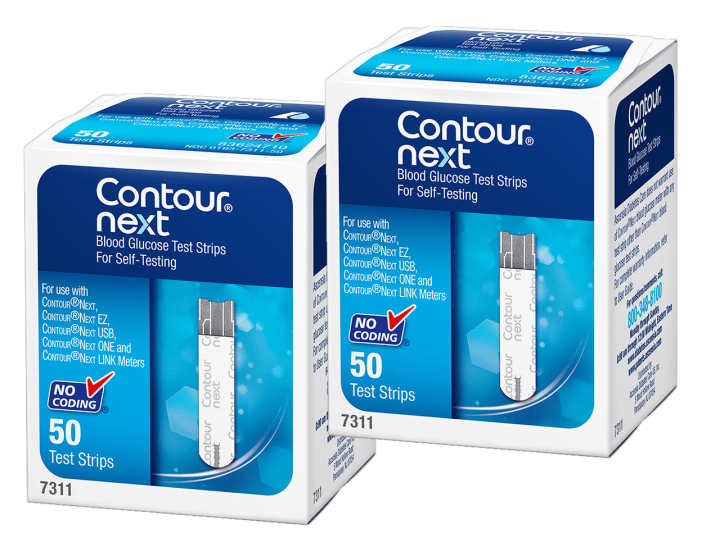
Contour Next is a family of fingerstick blood glucose meters used to check glucose from a small blood sample. The main thing to know is simple: the meter, strip, lancet, and technique all affect the reading. A reliable number starts before the blood drop reaches the strip.
Many people still search for Bayer Contour because older references used that branding. Current packaging and manuals may use Ascensia. Check the exact model name on your device before choosing strips, reading instructions, or using an app.
Key Takeaways
- Model names matter because strips and features can differ.
- Clean, dry hands reduce avoidable testing errors.
- Unexpected readings deserve a repeat check and symptom review.
- Apps and logs help track patterns, not diagnose problems alone.
- Your care team should set your testing schedule and action plan.
What Contour Next Does and Why Model Names Matter
Contour Next meters measure glucose in capillary blood from a fingerstick sample. They are used for self-monitoring of blood glucose, often called SMBG. This differs from a continuous glucose monitor, which estimates glucose in interstitial fluid under the skin.
The name on the meter matters because the Contour family includes several models. You may see Contour Next One, Contour Next Gen, Contour Next EZ, or older Contour names. These devices may look similar, but the user manual, compatible strips, app support, battery instructions, and symbols can vary.
If you are comparing a current meter with an older device, start with the label on the back of the meter. Then match that name to the strip vial and manual. For a general home-testing refresher, see Checking Sugar Levels At Home.
Why it matters: A correct strip match is a basic safety step.
Some people ask about the difference between Contour Next and Contour Plus. Treat them as different product lines unless the manual clearly says otherwise. Do not rely on a similar brand name when choosing strips, control solution, batteries, or app instructions.
If you are reviewing specific device pages, compare the labelled model before assuming features. The Contour Next Meter and Contour Next EZ Meter pages can help identify device names, but your physical meter and manual should remain the final reference.
Getting a Reading You Can Trust
A glucose meter reading is only as useful as the sample and setup behind it. Small testing errors can cause a number that does not match how you feel or what you expected. The most common avoidable issues involve food residue, wet hands, damaged strips, expired strips, or too little blood on the strip.
Wash your hands with soap and warm water when possible. Dry them fully before lancing. Alcohol wipes can be used when soap and water are not available, but the site should dry before testing. Moisture can dilute the sample or interfere with strip filling.
Keep test strips in their original container if the manufacturer instructs that. Close the cap promptly after removing one strip. Heat, humidity, and expired strips can affect performance. For strip-specific questions, review Diabetic Test Strips and the focused notes on Contour Next Test Strips.
First Drop, Second Drop, and Finger Choice
The best sample approach depends on the meter instructions and how clean your hands are. Some instructions or clinics may suggest wiping away the first drop in certain situations. In everyday home testing, clean and dry hands often matter more than the first-drop rule itself.
If the reading seems surprising, repeat the test after washing and drying your hands. Use a fresh strip. Compare the result with symptoms, recent food, activity, medication timing, and illness. Do not change prescribed medication based only on one unexpected reading unless your care plan specifically tells you how.
The side of the fingertip is often less tender than the center pad. Rotating fingers can reduce soreness. Avoid squeezing hard around the puncture site, because heavy pressure may mix tissue fluid with the blood sample. A warm hand can make blood flow easier.
Control Checks and Lab Comparisons
A control solution check can help confirm that the meter and strips are working within the expected range. Your manual will explain when and how to use control solution if it applies to your model. Common times include opening a new strip vial, dropping the meter, or getting results that do not match symptoms.
A home meter is not the same as a laboratory plasma glucose test. Home readings are meant for routine self-monitoring and pattern recognition. If your meter repeatedly gives readings that seem inconsistent with how you feel, bring the meter, strips, and log to your diabetes care team.
When to Check and How to Use the Numbers
Your testing schedule should come from your clinician or diabetes care plan. Many people are asked to check at specific times, such as fasting, before meals, after meals, at bedtime, before driving, during illness, or when symptoms suggest low or high glucose. The right timing depends on your treatment, risk of hypoglycemia, pregnancy status, work demands, and other health conditions.
Readings are most useful when they are connected to context. A number without notes can be hard to interpret later. Add simple details such as meal timing, exercise, illness, stress, missed food, alcohol intake, or medication timing if those factors apply.
Post-meal checks can show how food, portions, and timing affect glucose patterns. If your care team has asked you to track after-meal changes, the article on Postprandial Hyperglycemia explains the term and why it matters. For morning patterns, Fasting Hyperglycemia covers common causes of higher fasting readings.
Some records use mg/dL, while others use mmol/L. A unit mismatch can cause serious confusion when reviewing logs, travel records, or instructions from different health systems. The calculator below helps convert glucose units for record review only.
Blood Glucose Unit Converter
Convert glucose readings between mg/dL and mmol/L without changing the clinical value.
These calculations are for education only and do not replace clinical advice, diagnosis, or treatment. Always confirm medical decisions with a qualified healthcare professional.
The converter does not interpret whether a value is safe for you. Use your care plan and clinician-set targets when deciding what a reading means.
Apps, Batteries, and Records
The Contour Next One model may connect with a companion app, depending on the device, phone, and local support. App-connected meters can make logging easier by storing readings and adding notes. That can help you and your care team see patterns over days or weeks.
Pairing problems are usually practical rather than medical. Check that Bluetooth is enabled, the meter is the supported model, the app is current, and the phone operating system is compatible. If the app cannot connect, you can still record readings manually in a written log or another approved tracking method.
Battery steps also depend on the exact model. Look for the low-battery symbol and follow the manual for replacement. Keep the meter clean and dry. Avoid storing it in a hot car, humid bathroom, or place where strips may be exposed to moisture.
Quick tip: Keep the meter, strips, lancets, and log in one consistent place.
Digital records can be convenient, but they are not a substitute for clinical review. Bring summaries to appointments when your care team asks. If patterns change during illness, heat exposure, or changes in routine, the guide on Managing Diabetes While Sick may help you prepare questions for your clinician.
Comparing Contour Next With Other Meter Choices
Choosing a meter is less about one universal best device and more about fit. A good meter for one person may not suit another person if the display is hard to read, the strips are difficult to handle, or the app does not match their phone.
The main comparison points are practical. Think about strip compatibility, ease of handling, screen readability, memory features, app support, sample collection, lancet comfort, and whether your care team can review the data format. Broader meter comparisons are covered in Glucose Monitors And Meters.
| Decision Factor | Why It Matters | What To Verify |
|---|---|---|
| Exact model | Instructions and features can vary. | Check the meter label and manual. |
| Strip match | Wrong strips can prevent valid testing. | Match the strip vial to the meter. |
| Display and handling | Small screens or strips may be difficult. | Consider vision, dexterity, and lighting. |
| App support | Digital logs can simplify pattern review. | Confirm phone and app compatibility. |
| Care-team workflow | Some clinics prefer certain log formats. | Ask what records they want to see. |
If you are still deciding between meter types, Choosing A Glucometer explains how daily habits, vision, hand comfort, and record keeping can influence the decision. A review-style page can be helpful, but your own testing plan matters more than general rankings.
Other systems may use different strips, software, and accessories. Comparing devices is reasonable, but avoid mixing supplies across brands or product lines. Even if two strip vials look similar, the meter manual should decide compatibility.
Supplies, Compatibility, and Access Questions
Most meter problems start with basic supplies. Check that the strip container is closed, the strips are not expired, and the lancet device is clean and working. Use a new lancet as instructed. A dull lancet can make testing more painful and may require more pressure than needed.
Contour Next test strips should be matched to a compatible meter. Older Contour, Contour Plus, or other branded strips should not be assumed interchangeable. If a meter has been in a drawer for months, inspect the strip date, battery icon, screen, and manual before relying on it for routine tracking.
Lancets are separate from test strips. They create the puncture but do not analyze glucose. If your lancing device uses a specific lancet type, confirm the fit before use. Product details for Microlet Lancets can help you identify the accessory name, but the lancing device instructions still matter.
Some older meters may be replaced by newer models over time. If you hear that a Contour meter is discontinued, verify the exact model and compatible strips through official materials or a qualified pharmacist. Do not assume a newer device uses the same supplies.
For broader browsing, the Diabetes Supplies category lists related diabetes products and filters. CanadianInsulin.com functions as a prescription referral platform, and any required prescription details may be confirmed with the prescriber. Where permitted, dispensing and fulfilment are handled by licensed third-party pharmacies.
When a Reading Needs Extra Attention
An unexpected reading is not automatically wrong, but it deserves a careful pause. First, check the basics. Were your hands clean and dry? Was the strip expired? Did the strip fill correctly? Did the meter show an error code? Were you recently eating, exercising, sick, stressed, or taking medicine that can affect glucose?
If the number does not match how you feel, repeat the test with clean hands and a fresh strip. If the second result is still concerning, follow your diabetes action plan or contact your care team. Do not ignore symptoms just because a meter reading seems less severe than expected.
Symptoms of low glucose can include shakiness, sweating, hunger, confusion, weakness, or feeling faint. Symptoms of high glucose can include unusual thirst, frequent urination, fatigue, blurry vision, nausea, or abdominal discomfort. Severe symptoms, loss of consciousness, trouble staying awake, persistent vomiting, or signs of dehydration need urgent medical attention.
People who use insulin or medicines that can cause hypoglycemia should have a clear low-glucose plan from their clinician. If you have repeated highs or lows, pregnancy, kidney disease, gastroparesis, an eating disorder history, or frequent illness-related changes, ask your care team or a registered dietitian how often to check and what patterns to report.
Authoritative Sources
- FDA information on blood glucose monitoring devices
- American Diabetes Association blood sugar checking guidance
- Official Contour Next One product information
Contour Next meters can support everyday glucose tracking when the model, strip, and technique all match. Use the manual for device steps, keep notes that explain the reading, and ask your care team how the results should guide your personal diabetes plan.
This content is for informational purposes only and is not a substitute for professional medical advice.