
Shipping with this method takes 3-5 days
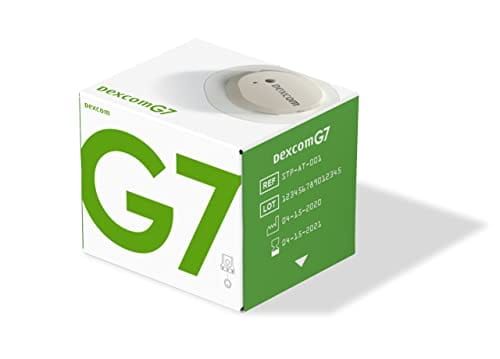
Dexcom G7 sensor (10 days)
Buy Dexcom G7 Sensor 10 Days Online


Dexcom G7 sensor (10 days) is a continuous glucose monitoring sensor used with the Dexcom G7 CGM system. It can be ordered online, with the current quantity and price shown during checkout so you can match the sensor to your diabetes monitoring plan. The G7 sensor is a wearable device that sends glucose readings to a compatible display device, such as a supported smartphone app or Dexcom G7 receiver.
The Dexcom G7 CGM sensor is designed for up to 10 days of wear, followed by a 12-hour grace period described by Dexcom. It is not an insulin product and does not treat high or low blood sugar. It provides glucose trend information that may help with daily diabetes monitoring when used according to the device instructions and your clinician’s plan.
Dexcom G7 Sensor Price and Quantity Decisions
The Dexcom G7 sensor price depends on the quantity and item configuration chosen during ordering. Because each sensor has a limited wear period, quantity affects how many sensor changes your purchase may cover. A lower displayed amount for one item may not represent the same practical supply as a multi-sensor quantity.
When reviewing Dexcom G7 sensor cost, first make sure the item is the 10-day sensor and not a receiver, an older-generation sensor, or a separate diabetes supply. The G7 system uses an all-in-one wearable sensor with integrated transmitter components, so it differs from systems that require a separate transmitter purchase.
If you are paying cash, use the same comparison basis for each option: product name, quantity, device generation, and display-device needs. US delivery from Canada may be relevant to the order logistics, but the most important product decision is whether the sensor format matches the CGM system you use.
| Decision point | What to verify |
|---|---|
| Product name | Dexcom G7 sensor (10 days), not a G6 item or receiver. |
| Quantity | How many sensor changes the order may support. |
| Wear period | Up to 10 days, plus the Dexcom-described 12-hour grace period. |
| Display device | Compatible app or Dexcom G7 receiver use. |
| Package condition | Sealed, undamaged packaging before application. |
Quick tip: Match the G7 generation first, then evaluate price and quantity.
How to Order Dexcom G7 Sensor Online
Ordering the Dexcom G7 10 day sensor starts with choosing the correct sensor item and quantity. Device wording matters with CGM products because sensors, receivers, test strips, and older-generation components are not interchangeable. A careful match helps prevent ordering a display accessory when the sensor itself is needed.
Use the product name on your CGM plan, device app, or clinic instructions to guide the order. Dexcom G7 sensors work within the G7 system, while G6 sensors belong to a different system. If your current setup uses a dedicated receiver, make sure the receiver is compatible with G7 before relying on it for readings.
- Choose the Dexcom G7 sensor 10 days item.
- Confirm the quantity before checkout.
- Match the sensor generation to your CGM system.
- Plan display-device use through a compatible app or receiver.
- Review address and handling information for US shipping from Canada if applicable.
The broader diabetes supplies category can help separate CGM sensors from meters, lancets, test strips, and other monitoring products. That distinction is useful when several diabetes devices appear similar in a cart or search result.
How the 10-Day Sensor Works in a CGM System
Dexcom G7 is a continuous glucose monitoring system. A CGM measures glucose in interstitial fluid, which is the fluid between cells, and sends readings to a compatible display device. The sensor can show current readings, direction arrows, and trend patterns between manual fingerstick checks.
The Dexcom G7 sensor transmitter design is integrated into the wearable sensor. That means a separate transmitter is not usually a separate G7 item to add for this system. This is one of the practical differences between G7 and some older CGM systems that used a sensor plus a separate reusable transmitter.
CGM data can support routine diabetes management, but it has limits. Interstitial glucose can lag behind blood glucose during rapid changes, such as after meals, exercise, or treatment of a low. Backup meter testing remains important when symptoms do not match the displayed value, when readings appear inconsistent, or when the device is warming up or showing an error.
- Sensor generation: G7 is not the same as G6.
- Sensor role: measures interstitial glucose trends.
- Display role: shows readings, alerts, and trend arrows.
- Backup supplies: useful when readings and symptoms conflict.
- Treatment decisions: should follow clinician guidance and device instructions.
10-Day Wear Time, Grace Period, and Replacement Planning
Dexcom states that the G7 CGM sensor is indicated to be worn for up to 10 days. Dexcom also describes a 12-hour grace period at the end of the sensor session. The grace period gives a short transition window, but it is not a new sensor cycle or a reason to rely on the same sensor indefinitely.
Will the Dexcom G7 work after 10 days? The practical answer is that it is designed around a 10-day wear period with the stated grace period. After the session ends, Dexcom says the G7 sensor cannot be restarted. Replacement planning should be based on scheduled sensor changes rather than attempts to extend the device beyond its intended use.
Questions about Dexcom G7 10 day vs 15 day sensors should be handled as product-specific comparisons. A 15-day search result, article, or pharmacy reference may refer to a different device presentation and should not be assumed to apply to this 10-day sensor. Follow the exact CGM system and sensor duration used in your care plan.
Why it matters: Timely replacement helps reduce gaps in glucose trend data.
Use in Diabetes Monitoring
The Dexcom G7 sensor is used as part of diabetes glucose monitoring. It can help show whether glucose is rising, falling, or staying steady over time. That information may help identify patterns around meals, activity, sleep, stress, or medication timing.
CGM readings do not replace a complete diabetes care plan. The sensor does not deliver insulin, correct hyperglycemia, or treat hypoglycemia. It provides information that may be used with clinician-directed actions, backup testing, and other diabetes supplies.
People using insulin, glucagon, blood glucose meters, or test strips may still need those items alongside a CGM. The diabetes condition section provides broader context on monitoring and treatment categories, while the diabetes products category helps organize common supplies used in diabetes care.
Storage, Handling, and Travel Basics
CGM sensors are medical device supplies, so storage and handling can affect performance. Keep the sensor in its original packaging until you are ready to apply it. Store it according to the package insert, and avoid heat, freezing conditions, direct sun, moisture, or crush damage.
Before applying a sensor, inspect the box, applicator, and seal. Do not use a sensor if the packaging appears opened, damaged, wet, or contaminated. Also check the expiration date, because expired device supplies may not perform as expected.
Travel planning should include enough sensors for scheduled changes and possible device problems. Keep sensors protected from pressure and temperature extremes during packing. If prompt, express, cold-chain shipping is offered for an order, follow any handling instructions included with the shipment and the manufacturer packaging.
Adhesive performance matters during the 10-day wear period. Skin oils, lotions, sweating, friction from clothing, and repeated pressure can loosen the sensor early. Follow Dexcom instructions for site preparation and avoid locations that may be irritated by waistbands, straps, or heavy movement.
Safety Checks Before Wearing a Sensor
A Dexcom G7 sensor attaches with adhesive and inserts a small flexible filament under the skin. Local reactions can include redness, itching, irritation, bleeding, bruising, discomfort, or swelling at the insertion site. Remove the sensor and contact a healthcare professional if you notice signs of infection, severe skin reaction, or worsening pain.
Sensor readings should be interpreted with symptoms and official device instructions. If a reading does not match how you feel, confirm with a blood glucose meter. This is especially important during warm-up, after a sensor error, during rapid glucose movement, or when alerts seem unexpected.
Dexcom labeling warns that the sensor should not be worn during MRI, CT scan, or diathermy, which is deep-heat therapy. Tell imaging or procedure staff that you use a CGM sensor before scans or treatments. Follow the device instructions for removal and replacement around those situations.
Medication interference can also matter. Dexcom warns that hydroxyurea may falsely elevate sensor readings, which could affect low-glucose alerts or treatment choices. Discuss medicines, supplements, unusual trends, and repeated sensor problems with your diabetes care team.
- Skin effects: watch for irritation, infection, or persistent pain.
- Reading mismatch: use a meter when symptoms conflict.
- Procedure safety: remove the sensor when instructions require it.
- Medication interference: ask about hydroxyurea if relevant.
- Missing data: do not guess from unavailable readings.
Alerts, Readings, and Backup Testing
Dexcom G7 alerts may help identify high or low glucose trends, but alerts do not replace judgment or urgent care. Set thresholds according to official setup instructions and your clinician’s direction. Avoid making treatment changes from one surprising number if symptoms and sensor data do not align.
Several practical issues can affect readings or alerts. Pressure on the sensor may create confusing values, loose adhesive may affect sensor contact, and fast glucose changes can widen the gap between blood and interstitial readings. A fingerstick meter remains an important backup tool when CGM data seems unreliable.
Your display device also affects daily use. Keep receiver charging, phone battery life, app permissions, Bluetooth settings, and notification volume in mind. After phone updates or app changes, confirm that alerts are still audible or visible in the way you expect.
For general diabetes education, the diabetes articles category can support broader reading about monitoring routines and device use. Internal education should not replace the Dexcom instructions for use or individualized medical advice.
Related Diabetes Supply Decisions
Related diabetes products may support the same monitoring routine, but they should not be substituted for a Dexcom G7 sensor unless they are part of your CGM setup. A receiver displays sensor data, while the sensor is the wearable component that gathers glucose information. Test strips and meters provide blood glucose checks rather than continuous trend data.
Dexcom G6 and Dexcom G7 supplies belong to different CGM generations. A G6 sensor, G6 transmitter, or G6 receiver should not be assumed to work with G7. Always match the device generation before evaluating quantity, price, or cash-pay choices.
Some people use CGM data alongside insulin pens, pumps, glucagon, meters, or test strips. Each supply has its own storage, replacement, and safety requirements. Build orders around the actual products used in your care plan rather than grouping all diabetes supplies as interchangeable items.
Authoritative Sources
Official manufacturer resources support the wear-time and restart details for the Dexcom G7 sensor. Dexcom states that the G7 sensor can be worn for up to 10 days with a 12-hour grace period, and that the sensor cannot be restarted after the session ends.
- For sensor wear duration, see Dexcom wear-time guidance.
- For restart limits, see Dexcom sensor restart guidance.
- For early-use expectations, see Dexcom first ten days guidance.
This content is for informational purposes only and is not a substitute for professional medical advice.
Blood Glucose Unit Converter
Convert glucose readings between mg/dL and mmol/L without changing the clinical value.
mg/dL
-
US reporting unit
mmol/L
-
International reporting unit
These calculations are for education only and do not replace clinical advice, diagnosis, or treatment. Always confirm medical decisions with a qualified healthcare professional.
HbA1c & eAG Calculator
Convert between HbA1c percentage and estimated average glucose using the ADAG relationship.
HbA1c
-
percentage
eAG mg/dL
-
estimated average glucose
eAG mmol/L
-
estimated average glucose
These calculations are for education only and do not replace clinical advice, diagnosis, or treatment. Always confirm medical decisions with a qualified healthcare professional.
CGM Time-in-Range Summary
Summarise CGM percentages across very low, low, in-range, high, and very high glucose bands.
Entered total
-
should equal 100%
Below range
-
very low plus low
Above range
-
high plus very high
Summary
-
common adult CGM targets vary by patient
These calculations are for education only and do not replace clinical advice, diagnosis, or treatment. Always confirm medical decisions with a qualified healthcare professional.
Carb Serving Calculator
Convert total carbohydrate grams into carb choices for meal planning and diabetes education.
Carb choices
-
total carbs divided by choice size
Rounded choices
-
nearest half choice
Carb calories
-
4 kcal per gram
These calculations are for education only and do not replace clinical advice, diagnosis, or treatment. Always confirm medical decisions with a qualified healthcare professional.
Glycaemic Load Calculator
Calculate glycaemic load from glycaemic index and available carbohydrate in a serving.
Glycaemic load
-
GI x carbs / 100
Range
-
single serving estimate
Total carbs used
-
serving carbs x servings
These calculations are for education only and do not replace clinical advice, diagnosis, or treatment. Always confirm medical decisions with a qualified healthcare professional.
Express Shipping - from $29.99
Prices:
- Dry-Packed Products $29.99
- Cold-Packed Products $39.99
Standard Shipping - $19.99
Shipping with this method takes 5-10 days
Prices:
- Dry-Packed Products $19.99
- Not available for Cold-Packed products
Does the Dexcom G7 have a 10-day sensor?
Yes. The Dexcom G7 sensor (10 days) is a wearable CGM sensor designed for up to 10 days of use, with a 12-hour grace period described by Dexcom at the end of the sensor session.
Will the Dexcom G7 work after 10 days?
Dexcom describes the G7 sensor as usable for up to 10 days plus a 12-hour grace period. After the sensor session ends, it should be replaced according to the device instructions rather than relied on beyond its intended wear period.
Can the Dexcom G7 sensor be restarted after 10 days?
Dexcom states that the G7 sensor cannot be restarted after the session ends. Plan replacement timing around the 10-day wear period and the stated grace period to avoid gaps in CGM data.
Is the Dexcom G7 sensor the same as a transmitter?
The G7 sensor includes integrated transmitter components in the wearable unit. It is different from older CGM systems that used a separate transmitter, and it is also different from a receiver, which displays readings.
When should I use a blood glucose meter with Dexcom G7?
Use a meter when symptoms do not match the CGM reading, when the sensor is warming up, when readings appear inconsistent, or when the app or receiver shows an error. Backup testing helps confirm glucose information when CGM data is uncertain.
Rewards Program
Earn points on birthdays, product orders, reviews, friend referrals, and more! Enjoy your medication at unparalleled discounts while reaping rewards for every step you take with us.
You can read more about rewards here.
POINT VALUE
How to earn points
- 1Create an account and start earning.
- 2Earn points every time you shop or perform certain actions.
- 3Redeem points for exclusive discounts.
You Might Also Like
Select options
This product has multiple variants. The options may be chosen on the product page
Select options
This product has multiple variants. The options may be chosen on the product page
Select options
This product has multiple variants. The options may be chosen on the product page
Select options
This product has multiple variants. The options may be chosen on the product page